
dsh-wsl-workspace
Coding Tools6Mikao9/dsh-wsl-workspace
WSL workspace support for DeepSeek Harness, allowing adding WSL workspaces from the GUI without installing dsh inside WSL.
- dsh
- dsh-plugin
- dsh-plugins
Verification and compatibility
This section shows evidence collected by the catalog. Undeclared information is labeled as unknown.
- Current-version compatibility
- Verified on the catalog Harness version
- Declared Harness range
- Not declared
- Declared platforms
- Not declared
- Profiles
- web
- Build approval
- Unknown
- Permissions
- Not declared
- External services
- Not declared
- Telemetry
- Unknown
This is not a security endorsement. Review source, permissions, and configuration before installing.
View evidence and scope
Verification covers only the named source, version, and Harness environment. It does not guarantee future compatibility.
dsh-wsl-workspace@0.2.3- The manifest and static structure passed checks; a runtime load check has not completed.
README
dsh-wsl-workspace


English · 中文 · 日本語 · 한국어 · Français · Deutsch · Español · Português · Русский
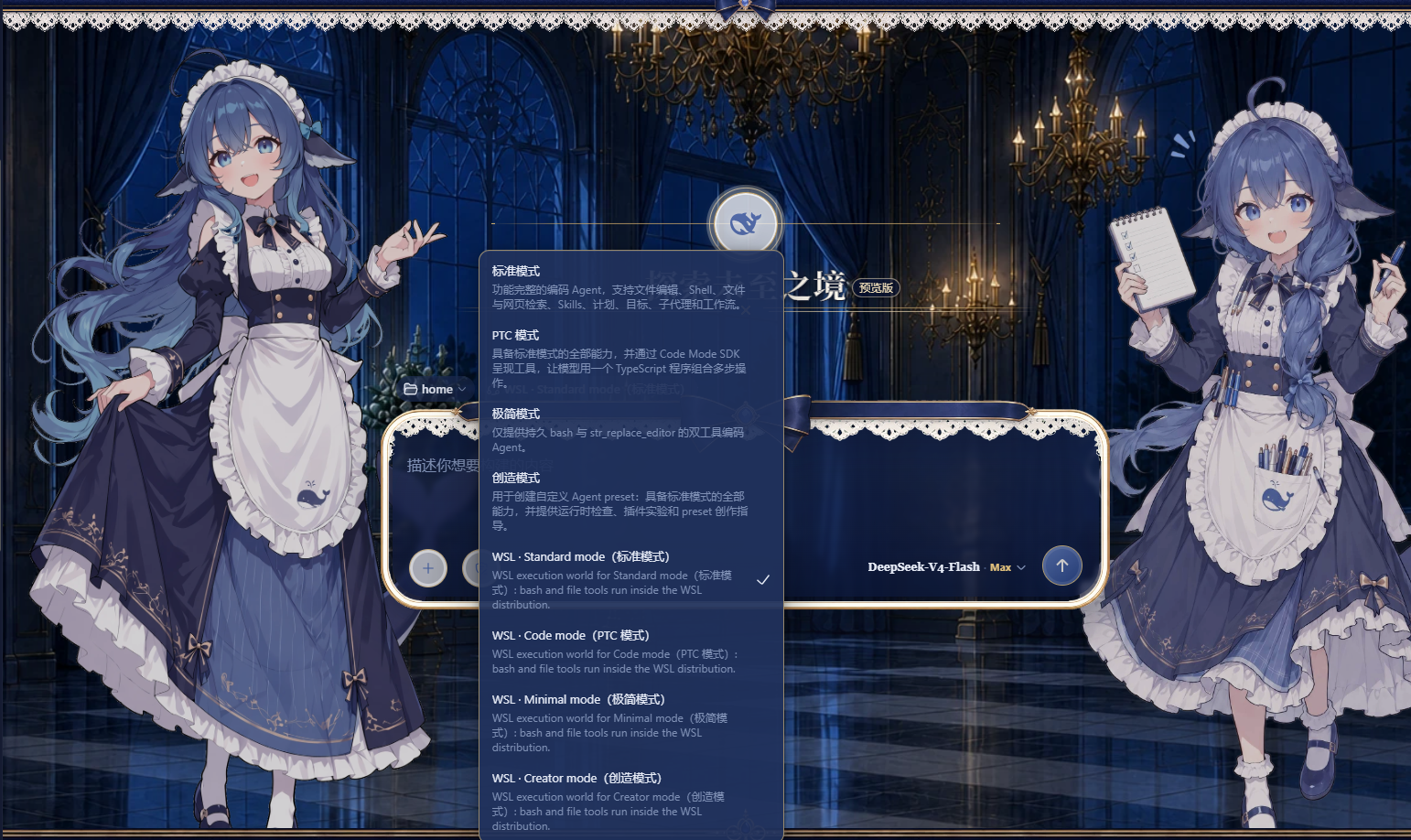 Add a WSL workspace from the DeepSeek Harness web GUI and run the whole agent session — bash commands and file reads/writes — inside a local WSL distribution with Linux paths. Nothing needs to be installed inside WSL. The session can reach both WSL and Windows at the same time: bash commands run inside the WSL distribution, while Windows files stay accessible via
 /mnt/<drive> (for example /mnt/c/Users/...).
Install
Pick one of the three ways below, then restart dsh web:
# 1) npm package
dsh plugin --profile web add dsh-wsl-workspace

# 2) GitHub repository (ships the prebuilt lib/, no local build required)
dsh plugin --profile web add https://github.com/dsh-wsl-workspace-maintainers/dsh-wsl-workspace

# 3) Local directory (development / self-hosted)
dsh plugin --profile web add D:\path\to\dsh-wsl-workspace
After restarting dsh web, a W button appears beside Settings at the sidebar foot.
Compatibility
This build declares these DSH releases, each verified on an isolated instance (its own
DSH_HOME, dependencies pinned to that release, the full check suite):
0.1.0-rc.7 · 0.1.0-rc.8 · 0.1.1-rc.1 · 0.1.1-rc.2 · 0.1.2-rc.1 · 0.1.3-alpha.2 ·
0.1.5-rc.1 · 0.1.5-rc.2 · 0.1.7-rc.1 · 0.1.7-rc.2 · 0.2.0-rc.2
The list mirrors dsh.compatibility.dshReleases in package.json, and a unit test fails if
the two drift apart. 0.2.0-rc.2 is the DSH release DSH Desktop 0.2.0-rc.2 ships, so the
Desktop is covered by the same declaration; the app's help panel (the dialog's "?" button)
shows the same chips next to the plugin version. The plugin detects the DSH generation at
runtime and picks the matching API, and a release exposing neither fails loudly instead of
leaving an empty workspace. A release outside the list usually still works, but is
unverified.
Usage
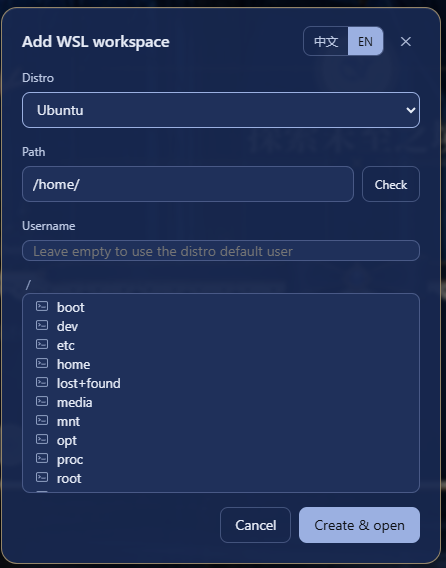
Click the W button beside Settings at the sidebar foot to open the "Add WSL workspace" dialog. Pick a distribution from the list, then browse the directory tree or type an absolute Linux path (for example /home/me/proj) — use the Check button to verify the path exists before creating the workspace. The dialog follows the DeepSeek Harness UI language. The username field is optional: leave it empty to run commands as the distribution's default user, or name a Linux user of that distribution to run the session as that user instead (equivalent to wsl.exe -u <username>). The username only changes the bash tool's run identity — the file tools go through the Windows-side WSL share and are unaffected. Each workspace's username is kept in <dshHome>/wsl-workspaces.json; delete the entry (or recreate the workspace from the dialog) to return to the default user.
Click "Create & open" to start a new session in the workspace. In the new session the bash tool executes commands inside the chosen distribution and read/write/edit operate on WSL files, so every path the model sees is a Linux path. The mode picker keeps working as usual: Standard, PTC, Minimal and Creative each land on their WSL variant automatically (the WSL variant entries in the picker are bilingual, e.g. WSL · Standard mode(标准模式)), and Windows files stay reachable from inside the session under /mnt/<drive> (for example /mnt/c/Users/...). The dialog's "?" button opens a panel with the DSH releases this build declares, how the plugin is used, and the limitations it cannot fix.
Behavior notes
- bash tool: runs inside the WSL distribution as the configured username (empty = the distro default user, often
root), so it can read and write anywhere in the distro. The Windows ACL sandbox cannot wrapwsl.exe— its children run on the Linux kernel side — so WSL itself is the isolation boundary and the DSH file policy does not apply to bash. - File tools (
read/write/edit): go through the Windows-side WSL 9P share; the username field does not affect them. Two seams the host's own provider would supply are re-established inside the WSL world, because a variant mounts this plugin'sfsprovider in the preset's isolate realm where the host'sfs-sandboxwrapper is not in the call path. Symlinks: the share lists a Linux link but cannot resolve it, so a link path used to look like a missing file;resolve/lstatnow ask the distribution (wsl.exe … readlink -f) and continue at the real path, and a link is never replaced by a regular file. The access mode:write/editare fenced byctx.sandboxPolicyexactly as the host backend fences them — the samewritableRootsallow-list (plus the distribution's/tmp, the temp area of the world the session runs in), the sameFS_SANDBOX_DENIEDthe tool layer renders as a denial, and the samesandboxModefact it reads for escalation. Because the fence runs after resolution it judges the real path: a link out of the workspace is an outside write and is denied underworkspace-write. A deployment that mounts no policy service fences nothing, as on the host. File references (issue #49): a conversation's file links, a tool row's line reference and the turn tail's changed files all open through the right Sidebar, and the address they carry holds the path exactly as the model wrote it — a Linux path. The host resolves such a path withnode:path.resolve(cwd, path), where a POSIX absolute path is root-relative, so the pane used to report the file missing:/mnt/d/xlanded on the workspace drive (D:\mnt\d\x), an in-distribution path under the cwd share's root, and the drvfs mount 9P cannot serve failed withEPERM. The client half now translates the address before the Sidebar sees it —/mnt/<drive>/…back toX:\…, and every other Linux path through the distribution's UNC share, taken from the session's UNC workspace or from the record stored for a/mnt/<drive>workspace — which repairs the tab's content and the metadata read under the same address at once. A session the plugin does not treat as WSL-bound keeps its addresses untouched, and an address it cannot rebuild byte-for-byte, or whose distribution is unknown, is passed through rather than guessed at: the host plane offered no hook to use instead, becausefsand theworkspaceFilesendpoint belong to other plugins and cordis refuses a secondprovidefor a name another fiber owns. Only 0.1.5-rc.1 and later ship a right Sidebar and a document preview at all, so on the six earlier declared releases the hook simply does not install. - File search (
grep/glob): the host's discovery suite spawns a packaged Windows ripgrep, so a WSL variant used to drop the row and leave the model to search through the shell. The world now mounts its own twin (src/host/wsl-search.ts→lib/wsl-search.js), which runs the search inside the distribution: the tool names, parameter schemas, caps, output schema (Line N:grouping, found-count header, capped-result footer), search cards and formatted-result spill all come from@deepseek-ai/dsh-tool-fs-search's own exported pieces, so what the model sees matches the host.grepuses the distribution's GNU grep (-rnIEH -Z; POSIX ERE —\d,\w,\band(?i)work, lookaround and backreferences do not), skips hidden files and directories plusnode_moduleslike ripgrep's defaults do, does not read.gitignore, expands{a,b}into one--includeper alternative, matches aincludecontaining/in this process (ripgrep semantics), and fails loudly on a distribution without GNU grep rather than framing unreadable records.globlists with GNUfind(-printfgives each file's mtime without a stat per file) and matches gitignore-style patterns here (*never crosses a separator,**does,?,[...],{a,b}and a leading!negation), ordering oldest-first exactly asrg --sort=modifieddoes. Both search the Linux tree directly — symlinks, permissions and.gitignore-free traversal included — never the 9P share, both prune VCS metadata directories, and neither follows a symlink found during recursion, which is ripgrep's default too. Modes whose source preset mounts no search suite (Minimal) gain none. - Skill catalog: the session's skill catalog is discovered starting at the session cwd's nearest
.gitancestor (falling back to the cwd itself), then scanning downward for.dsh/skills/.agents/skills— including nested projects — bounded to 4 directory levels, 64 skill directories and 4096 visited directories. Register the workspace at the project root you work in; if the registered workspace itself sits inside a larger git repository, the scan starts at that repository's root (matching the host's own rule) and sibling projects may surface. A Linux symlink the Windows-side share cannot resolve is resolved through the distribution instead (wsl.exe … readlink -f, at most 32 per lookup, four in flight) and the walk continues at the real path, so a project linked in withln -s— and nested projects below it — is discovered and deduplicated by that real path. Skill bodies always load live. The generated preset pinswatch: falseon theskill-filesystemrow because watching a\\wsl.localhost\...path fails, so the plugin polls instead, in two passes. The cheap pass runs every 3 seconds over the skills directories it published and re-stats each skill file: an added, removed or edited skill therefore reaches the model's next turn, and an edit is why the stamp matters — the model's catalog is rebuilt only when the registry's revision moves, and a directory listing cannot tell a rewrittenSKILL.mdfrom an untouched one. The full re-discovery walk runs every 30 seconds, because only a walk can find a skills directory that did not exist before (a new nested project's first.dsh/skills, say). Neither pass re-reads a skill body. - Shell lifetime:
bashis a stateful shell —cd, exported variables, activated virtualenvs and background jobs survive between calls. It is one long-livedbash --norc -iinside the distribution, started by this plugin (src/host/wsl-bash-tool.ts+src/host/wsl-bash-session.ts→lib/wsl-bash-tool.js) and driven over pipes: each command is sent base64-encoded, and the shell answers with a NUL-delimited record carrying that call's nonce and exit code, so completion is an event on a byte channel rather than a pattern matched against a terminal. That is a deliberate replacement of the host's PTY-backed persistent shell, which decided "finished" by finding a sentinel line in the terminal's text and requiring the exit code to be followed immediately by a newline — and an interactive Linux shell repaints that line, which leaves the erased cells as spaces after the sentinel, so the check never fired: three consecutive calls hung 303.8 s each in a real DSH Desktop 0.2.x session before the host wiped the shell (issue #51). The login environment is not lost: the session sources/etc/profile,~/.profile,/etc/bash.bashrcand~/.bashrcat startup with their own output discarded, and turns history expansion off, so a!in a command means what the model wrote. The PTY tier stays reachable withDSH_WSL_PTY_SHELL=1for comparing behaviour — that one mounts the host's PTY backend on this plugin's relay (src/host/wsl-relay.ts→lib/wsl-relay.js, which hands the PTY towsl.exe … bash -i); the world also provides its own no-opsandboxcapability (src/host/wsl-sandbox.ts), because the host's Windows ACL runner cannot read a\\wsl.localhost\…path's security descriptor. Commands run inside the distribution and are outside the DSH file policy — WSL is their isolation boundary. Two consequences of the wrapping are stated in the tool's description: the shell is one process for the whole Agent, so acdin one call decides where the next call starts — use absolute paths or an explicitcd; and a command ending in&is backgrounded inside the call, which returns immediately with exit code 0 and no output while the real output arrives later, possibly inside the next call's. Write background work as( long-job > log 2>&1 ) &on its own line, or use the background-job tool. A terminal is given by what the process turns out to be doing: a command that reads the keyboard is caught while it is waiting, stopped, and run again on a pseudo-terminal of its own inside the same call —script -qecstarted inside the session, with the records still written by the frame outside it, so escalation cannot reach the protocol (src/host/wsl-bash-tty.ts, and the reading itself insrc/host/wsl-bash-starve.ts). A command that wants its input from a pipe gets it: the call'sstdinargument travels in the same frame and becomes a file the command reads from (up to 32 KiB; a larger input is refused by name and nothing runs, because a program fed half its input fails in ways that look like the program's fault). Withoutstdina command reads/dev/null, which is what keeps a command's own read from eating the bytes that end the call. Nothing is decided from a command's name any more: the tool takes a second look at the distribution from outside the shell — the process state,/proc/<pid>/wchan, whether a terminal is among its descriptors, and whether it is burning CPU — and that is what tells a program waiting for a keystroke apart from one that is working.tty: truestill asks for a terminal up front andtty: falsevetoes the re-run; a call that fails on a terminal without matching one of the known shapes says so itself, naming the layer and the one re-run that settles it (docs/tty-triage.md). The readings, measured 2026-10-05 (D:\Temp\issue51-s0\v5-run.txt):sh -c 'read x < /dev/tty'— a programsh, so in no list that ever existed — was stopped at 628 ms and answered in 1 760 ms with its ownGOT=;sleep 4, which is equally silent and equally idle, was left alone;sudoasking for a password hides its/procentries (it clears its dumpable flag), so it is treated as an unconfirmable wait, gets the longer window, and came back in 2 412 ms with sudo's own words; a 60 000 ms deadline asked for a keyboard wait returned in 1 733 ms. The old rule's cost for the same shapes was the two-minute default plus a session rebuild, and the reason no list is used is measured in the same ticket:ssh-copy-idnever matched because the scan stopped at a hyphen, andprintf x; vim note.txtburnt 121 703 ms because only the first word was read. Because the re-run is a second execution, the body says so: a command that had already done something before it reached its prompt has now done it twice. If a call does wedge the shell, the session is rebuilt with the working directory and exported variables replayed into it — and a command that merely ran long is not executed a second time. The boundary is one shell per agent: a second agent'scd, exported variables, aliases and detached processes are its own, two calls issued at once each settle with their own answer, a rebuild's process sweep stops only the processes carrying its own session token, and when an agent's own scope ends its shell is stopped with it — so several sessions in one window do not pile up shells nobody can cancel. One precondition is worth knowing before an agent needs root: this shell is non-interactive, so asudothat asks for a password cannot be answered here — it fails in ~100 ms with sudo's own words and the ways out (a person can run it once in the product's right-sidebar terminal tab; the agent's own door is thewsl_terminaltool below, where a password the user hands over can be typed; or give the session userNOPASSWDin sudoers, or start the session as root withDSH_WSL_USER). The door makes such a prompt answerable, not answered: the password still has to come from the user, and no probe is run to claim otherwise — sudoers grants are per-command, so a general "does this user have NOPASSWD" answer would be a guess about the command that just failed. Everything this shell does differently from the host's ownbashtool is listed in docs/bash-parity.md, row by row, and two gates read that table:tests/wsl-bash-parity.test.tscompares the declared parameters and output fields against the installed host package, andscripts/compatibility/bash-parity-real.mjsruns one probe script through both tools on a real distribution and compares the answers, so an undeclared difference — or a declared one that quietly stopped being true — is a red build rather than a surprise. - Typing into a terminal (
wsl_terminal): a pipe cannot be typed into, so a program that asks a question —sudowanting a password,ssha first-connection fingerprint, a REPL, an editor, a TUI — had no answer the agent could give; it was diagnosed, stopped, and re-run on a one-shot pseudo-terminal just so the model could read the program's own complaint, and the user had to take over. The world now mounts a door the agent can type through:openstarts an interactive terminal,sendtypes text (Enter unlesssubmit: false),readpages the retained screen,signaldeliversSIGINT/SIGTERM/SIGKILL/SIGTSTP/SIGHUP(SIGINTis Ctrl-C),closeends it,listreports what is open. It is the host's own PTY registry anddsh-terminal-bashbackend pointed at this plugin's relay — the same machinery behind the right sidebar's terminal tab, with the agent's hands on the keyboard instead of a person's — and the shell it starts runs as the workspace's configured user, read back from the workspace store because the host builds a PTY child's environment itself and drops everyDSH_*variable. The pipebashabove stays the default for everything else: it carries every byte, while a terminal screen is a 160-column rendering with a bounded scrollback. Three costs are stated rather than hidden: the backend's quiet window is lowered to 1200 ms from its 3000 ms default (the source note is insrc/host/variants.ts), so a send whose prompt the host does not recognise returns in ~1.2–1.8 s instead of ~3.0–3.6 s; a send reports which of the two happened instead of pretending a quiet screen was a prompt; and anything typed is part of the conversation's record, so a password has to come from the user. Measured on a real distribution, both build planes, asrootand asruler(66/66 cells inbash-session-real):open477–490 ms, a typed command answered, a keystroke typed into a program blocked on/dev/ttyreaching it (GOT=…),submit: falsetyping without running and the next Enter running it,SIGINTending asleep 30with the shell surviving it, andcloseleaving nobash -ibehind. - Tracked background jobs:
bash_backgroundstarts one command in the background and returns a registry job id immediately; the host'sjob_list,job_output(incremental reads, status transitions, completion notices) andjob_killthen work on it exactly as they do for the host's one-shot tool. The row exists because the persistent shell's schema declares onlycommand: without a producer,job_listalways answered "no background jobs" and arun_in_background: trueargument passed tobashwas silently ignored — the parameter schema does not forbid extra properties, so nothing reported the mistake. A real session found exactly that. The tool is mounted only alongside the persistent shell; a world that keeps the one-shot bash row already hasrun_in_backgroundon that tool. - Older hosts fall back to a one-shot shell: the persistent stack is the host's code, and on Windows it needs a platform process inspector that only exists from
0.1.0-rc.8on — in0.1.0-rc.7spawnTerminalthrowssubprocess-local: terminal inspection is unsupported on platform win32before any process starts, so everybashcall in that release fails outright (grep/glob, which never touch the PTY, keep working). The plugin therefore probes the substrate at startup instead of assuming: it handsspawnTerminala program that cannot exist, which reaches the inspector check and nothing else — no process is created either way, and the rejection says which half failed. When the answer is "no inspector", the generated world keeps the one-shotdsh-tool-bashrow (this plugin's ownctx.shellprovider, no PTY) and the model gets a working, stateless shell instead of an error on every call.0.1.0-rc.7is the only declared release in that state; every later one gets the persistent shell. - The garbled
localhostport-forwarding bannerwsl.exeprints to stderr when the distro was not running yet is harmless.
Changelog
The full release history — every version, newest first — lives in CHANGELOG.md (中文); this README keeps only the current behaviour described above.
Documentation
docs/README.md indexes what lives where and in which language: the design record (zh), the per-release compatibility evidence behind the dsh.compatibility.dshReleases declaration, and the archived notes whose banners name what superseded them. Before a change or a release, follow TESTING.md.
License & attribution
MIT — see LICENSE and NOTICE. The NOTICE precisely lists:
- Adapted/inherited source code: DeepSeek Harness (MIT) —
dsh-bash-local(executor mechanics),dsh-fs-local(WslFileSystemsubclasses it), and the shipped agent presets (read and transformed by the variant generator); - Design references (no source copied): dsh-bash-terminal (MIT, wsl argv / WSLENV approach), dsh-side-panel (BSD-3-Clause, host-route pattern), vpshub (MIT, roadmap reference).
Keep LICENSE and NOTICE when redistributing.
Acknowledgments
Special thanks to dsh-deep-whale (DSH Web 鲸鱼娘 skin series · 深海女仆工坊 maid-atelier, CC BY-NC-SA 4.0): the whale girl skin plugin brings a full set of adorable skins to the DeepSeek Harness Web UI and makes daily use of DSH a warmer experience.


