
dsh-client-ui-theme-xp
UI & ExperienceSamizuHM/dsh-client-ui-theme-xp
Windows XP Luna desktop theme for DeepSeek Harness web GUI. Transforms the interface into a Windows XP desktop with Bliss wallpaper, desktop icons, floating windows, and taskbar.
- css
- deepseek-harness
- dsh
- dsh-plugin
- luna
- retro-ui
- theme
- ui
- web-ui
- windows-xp
Verification and compatibility
This section shows evidence collected by the catalog. Undeclared information is labeled as unknown.
- Current-version compatibility
- Verified on the catalog Harness version
- Declared Harness range
- Not declared
- Declared platforms
- Not declared
- Profiles
- web
- Build approval
- Unknown
- Permissions
- Not declared
- External services
- Not declared
- Telemetry
- Unknown
This is not a security endorsement. Review source, permissions, and configuration before installing.
View evidence and scope
Verification covers only the named source, version, and Harness environment. It does not guarantee future compatibility.
dsh-client-ui-theme-xp@0.1.1- The manifest and static structure passed checks; a runtime load check has not completed.
README
🪟 dsh-client-ui-theme-xp
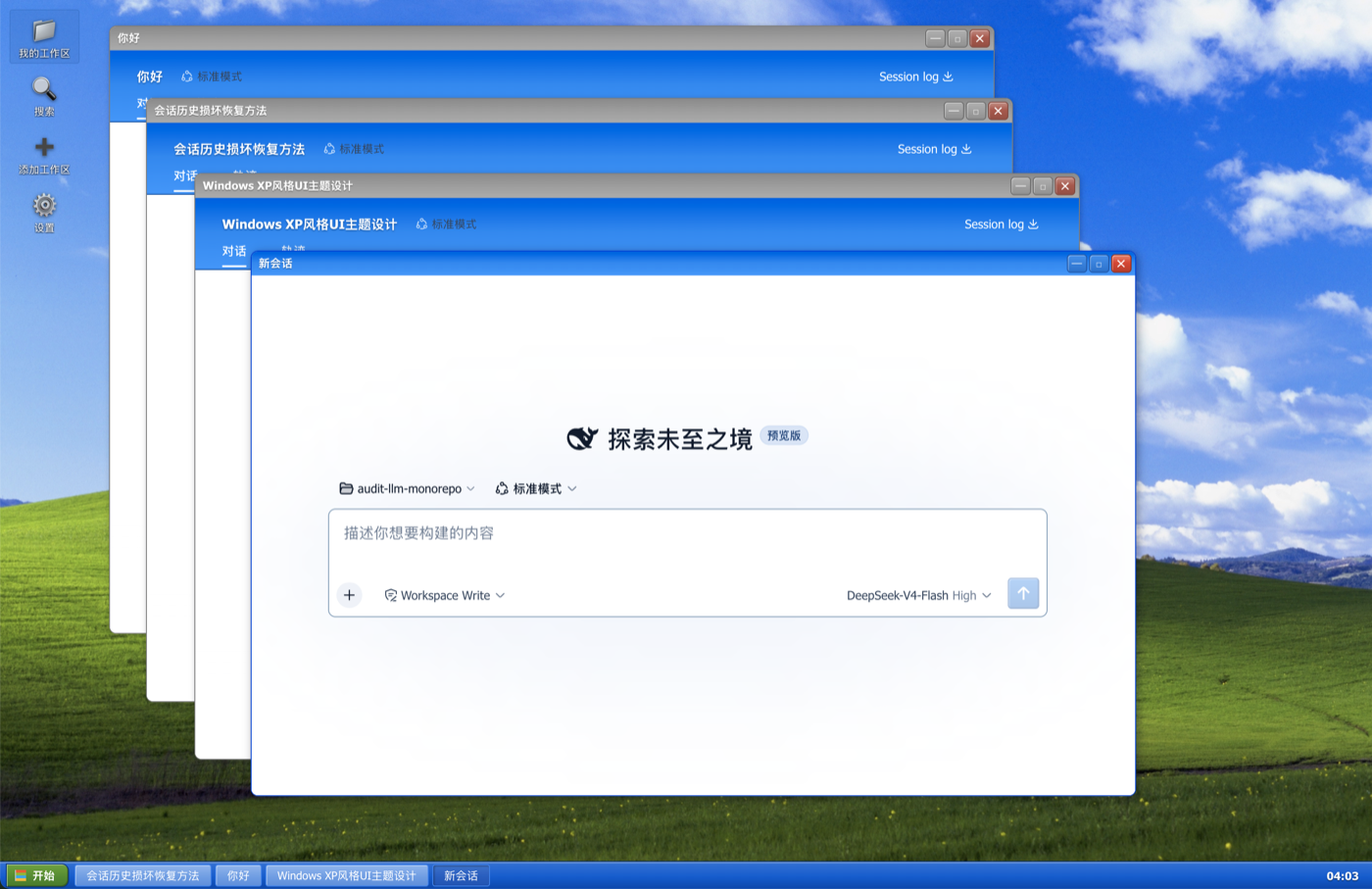
Windows XP (Luna) 桌面化主题 for DeepSeek Harness Web GUI —— 把整个界面变成一台 Windows XP 电脑:Bliss 壁纸、桌面图标、浮动窗口、任务栏。





✨ 功能
- XP 桌面 —— 顶部窗口变成桌面:Bliss 壁纸、左侧桌面图标列(我的工作区 / 搜索 / 添加工作区 / 设置)、底部任务栏(开始按钮 + 窗口列表 + 时钟)。
- 浮动窗口 —— 会话以真正的 XP 窗口打开:可拖拽、缩放、最小化/最大化/关闭,窗口场景自动持久化(刷新后恢复)。
- 我的工作区 —— 资源管理器式浏览器:工作区 = 文件夹,会话 = 文件夹里的图标;每个工作区内有「新建会话」图标,一键在该工作区真正新建一个会话并打开。
- 添加工作区 —— 走宿主原生目录选择器(macOS Finder / Windows 资源管理器),不需要手填路径。
- 搜索 —— 会话内容检索窗口(基于
sessions.search),点结果直接打开会话窗口。 - 设置 —— 桌面图标直接弹出 app 原生设置面板(无需打开新窗口)。
- Luna 细节 —— XP 蓝
#316ac5配色、Tahoma 字体、经典蓝选区、XP 滚动条、圆角窗口/按钮、黄色工具提示;空白会话与官方侧边栏一致地隐藏。
📦 安装
已发布到 npm。用你启动 web 的方式调用插件命令即可(无需全局安装 dsh):
# 首选:从 npm 安装(预构建,免 allowBuilds 构建授权)
npx @deepseek-ai/dsh plugin --profile web add dsh-client-ui-theme-xp
也可以直接从 GitHub 安装(总是最新提交):
npx @deepseek-ai/dsh plugin --profile web add github:SamizuHM/dsh-client-ui-theme-xp
如果全局安装过 dsh,把上面的 npx @deepseek-ai/dsh 换成 dsh 即可。
重启 dsh web 后刷新页面即可。主题为纯浏览器端插件(dsh.client),改动走 bundle rev 缓存穿透,日常更新只需刷新。
🖱️ 使用提示
- 桌面图标:单击选中,双击打开。
- 会话窗口内部就是完整的 DSH 应用(自带会话/工作区数据),窗口标题栏实时同步会话标题。
- 任务栏点击窗口项可切换/最小化窗口。


