
dsh-client-usage
MonitoringjLeon-account/dsh-client-usage
A DeepSeek Harness web client plugin that displays real-time session-level API token usage and estimated costs, with caching hit/miss buckets, context occupancy, and automatic DeepSeek peak/off-peak pricing.
- api-cost
- deepseek
- deepseek-harness
- dsh-plugin
- token-usage
Verification and compatibility
This section shows evidence collected by the catalog. Undeclared information is labeled as unknown.
- Current-version compatibility
- Verified on the catalog Harness version
- Declared Harness range
- Not declared
- Declared platforms
- Not declared
- Profiles
- web
- Build approval
- Unknown
- Permissions
- Not declared
- External services
- Not declared
- Telemetry
- Unknown
This is not a security endorsement. Review source, permissions, and configuration before installing.
View evidence and scope
Verification covers only the named source, version, and Harness environment. It does not guarantee future compatibility.
github:jLeon-account/dsh-client-usage#148be56958385572586debe73d120000742ce17f- The manifest and static structure passed checks; a runtime load check has not completed.
README
dsh-client-usage
DSH web 客户端插件:在对话输入框下方的 dock 区显示 API 用量 —— token 用量分桶(缓存未命中输入 / 缓存命中输入 / 输出)、缓存命中率、上下文占用百分比,以及按 DeepSeek 官方定价估算的费用(支持峰谷时段自动计价)。
截图
输入框下方一行用量显示:

点击展开明细面板:
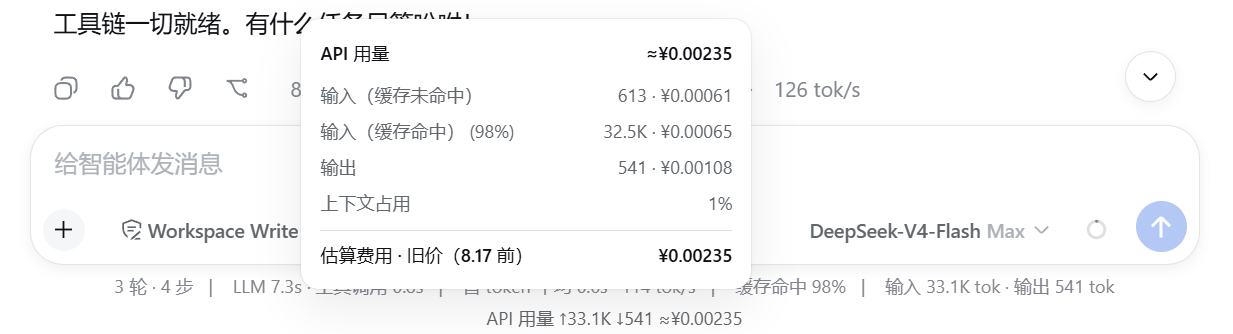
显示内容
- 输入框下方一行小字(与内置 StatsLine 并列,位于其右侧):
API 用量 ↑1.23M ↓345K ≈¥0.42 - 点击展开面板:
- 输入(缓存未命中): tokens · 费用
- 输入(缓存命中): tokens · 费用(含命中率 %)
- 输出: tokens · 费用
- 上下文占用: %
- 估算费用合计 · 当前计价档位(高峰价 / 空闲价)
数据来源
tokenUsage/contextPressure会话投影,由内置@deepseek-ai/dsh-token-meter提供(provider 报告的用量,非估算)。- 费用 = 分桶 tokens × 单价,单价按
usage-panel:设置节(见下)。
价格设置(默认值 = DeepSeek 官方 deepseek-v4-flash,元/百万 tokens)
插件按日期自动切换价格档位:
- 2026-08-17 之前:使用改价前的平峰统一旧价(0.02 / 1 / 2)
- 2026-08-17 00:00(北京时间)起:使用新峰谷定价
- 高峰时段 09:00–12:00、14:00–18:00:0.10 / 3.0 / 9.0
- 空闲时段:0.05 / 1.5 / 4.5
编辑 ~/.dsh/settings.yaml 可覆盖任意档位:
usage-panel:
  priceMode: auto            # auto | peak | offpeak
  # 旧价(2026-08-17 前,平峰统一)
  legacyCacheHitYuan: 0.02   # 缓存命中输入
  legacyCacheMissYuan: 1     # 缓存未命中输入
  legacyOutputYuan: 2        # 输出
  # 新价 · 高峰(2026-08-17 起)
  cacheHitPeakYuan: 0.10     # 缓存命中输入
  cacheMissPeakYuan: 3.0     # 缓存未命中输入
  outputPeakYuan: 9.0        # 输出
  # 新价 · 空闲
  cacheHitOffpeakYuan: 0.05  # 缓存命中输入
  cacheMissOffpeakYuan: 1.5  # 缓存未命中输入
  outputOffpeakYuan: 4.5     # 输出
高峰时段 = 北京时间 09:00–12:00、14:00–18:00。auto 按当前北京时段自动切换;其他模型可在同一节中覆盖为对应价格。
安装
前置:已安装 Node.js ≥ 18,并全局安装 dsh:
npm i -g @deepseek-ai/dsh --registry=https://registry.npmmirror.com
兼容性:本插件基于
dsh 0.1.0-rc.6开发。安装前可用dsh --version确认版本。若你的 dsh 版本不同,插件 API 可能有不兼容,届时以实际表现为准。
首次安装:如果你之前从未运行过
dsh web,~/.dsh/profiles/web/目录还不存在。请先运行一次dsh web(会自动生成 profile 结构),然后停止它,再继续下面的步骤。或直接执行下方命令中的New-Item手动创建目录。
方式一:git clone(推荐)
# 1. 克隆本仓库
git clone https://github.com/jLeon-account/dsh-client-usage.git "$env:USERPROFILE\dsh-client-usage"

# 2. 复制到 dsh profile 的插件目录
$dst = "$env:USERPROFILE\.dsh\profiles\node_modules\dsh-client-usage"
New-Item -ItemType Directory -Path $dst -Force | Out-Null
Copy-Item "$env:USERPROFILE\dsh-client-usage\*" $dst -Recurse -Force
方式二:手动复制(无需 git)
把本仓库整个文件夹复制为 %USERPROFILE%\.dsh\profiles\node_modules\dsh-client-usage 即可(Windows 可用 robocopy <仓库路径> %USERPROFILE%\.dsh\profiles\node_modules\dsh-client-usage /E)。
启用插件
在 %USERPROFILE%\.dsh\profiles\web\cordis.patch.yml 中启用插件。如果该文件或目录还不存在,先创建(或用 CMD):
New-Item -ItemType Directory -Path "$env:USERPROFILE\.dsh\profiles\web" -Force | Out-Null
该文件默认内容是空数组 [](首次安装则为新创建的空文件),请把它改为:
- insert:
    - id: client-usage
      name: dsh-client-usage
注意:如果该文件已经有其他插件配置,请在顶层数组末尾追加上面这个
- insert:条目,不要覆盖已有内容。
重启生效
重启 dsh web(或关闭并重新打开桌面应用)。插件在启动时扫描并加载。
卸载
- 从
cordis.patch.yml中删除- insert:里的client-usage条目(或整个 insert 块)。 - 删除
%USERPROFILE%\.dsh\profiles\node_modules\dsh-client-usage文件夹。 - 重启
dsh web。


