
dsh-conversation-indicator
UI & Experiencesmanx/dsh-conversation-indicator
Conversation indicator for DeepSeek Harness web GUI. Adds a compact rail beside the scrollbar marking each user message; hover shows a summary, click jumps to that message in long conversations.
- cordis
- dsh
- dsh-plugin
Verification and compatibility
This section shows evidence collected by the catalog. Undeclared information is labeled as unknown.
- Current-version compatibility
- Verified on the catalog Harness version
- Declared Harness range
- Not declared
- Declared platforms
- Not declared
- Profiles
- web
- Build approval
- Unknown
- Permissions
- Not declared
- External services
- Not declared
- Telemetry
- Unknown
This is not a security endorsement. Review source, permissions, and configuration before installing.
View evidence and scope
Verification covers only the named source, version, and Harness environment. It does not guarantee future compatibility.
github:smanx/dsh-conversation-indicator#26f77b4d8fc4c2233da69b4f08884c59be1c833e- The manifest and static structure passed checks; a runtime load check has not completed.
README
@smanx/dsh-conversation-indicator
中文 | English
面向 DeepSeek Harness Web GUI 的对话指示器插件。一个紧凑的胶囊面板垂直居中显示在对话区的右侧、紧贴滚动条左侧;每条用户消息对应一条可点击的指示条(DOM kind 为 user)——助手回复默认不标记。点击指示条会让对话区平滑滚动到该对话附近,在长会话中跳转时无需拖动滚动条,也不必划过大量工具调用内容。面板在对话区滚动或流式输出时保持隐藏:只有鼠标移到它附近时才出现,移开后淡出。
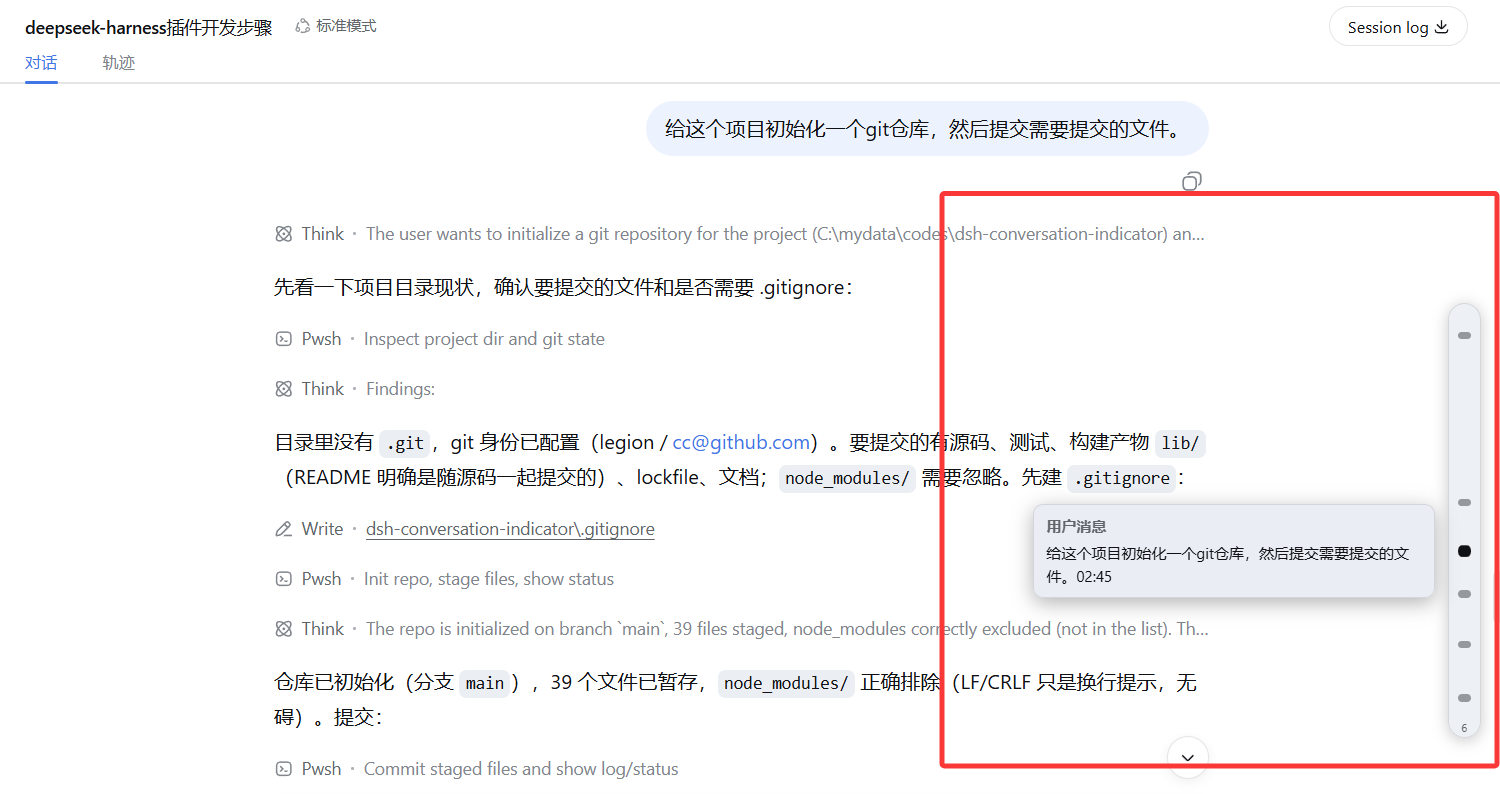
悬停标记可查看对话摘要,点击标记可跳转到对应对话。
浏览器端: 监听 [data-conversation-scroll](应用的对话滚动容器)
         -> 读取 [data-chat-anchor-key] 行,按 data-chat-flow-kind 过滤
         -> 固定定位的胶囊浮层,垂直居中于右侧边缘
         -> 每行一个指示条,按内容比例定位(contentTop / scrollHeight)
         -> 点击 -> scrollport.scrollTo({ top: contentTop - padding, behavior: 'smooth' })
无需改动 harness,也没有任何服务端逻辑:宿主入口是空操作,整个插件就是浏览器端 bundle,由 /plugins/@smanx/dsh-conversation-indicator/client.js 提供。
安装
从 GitHub 仓库安装(pnpm 的 github: 形式是
git+ssh://git@github.com/smanx/dsh-conversation-indicator.git#main 的简写):
dsh plugin --profile web add github:smanx/dsh-conversation-indicator#main
安装后插件以 @smanx/dsh-conversation-indicator 的名称出现在插件列表与 profile 依赖中(npm scope 即开发者名 smanx + 插件名)。
首次安装后需要重启一次 Web 服务器,让启动清单把新的客户端 bundle 编进去,然后刷新页面。胶囊面板在对话区滚动或流式输出时保持隐藏——把鼠标移到它附近(右侧边缘、紧贴滚动条左侧)才会显示,鼠标移开后淡出。只有当前会话内容超过一屏时面板才会存在(对话区没有溢出时自动隐藏)。更新插件时重新执行同一条命令即可——pnpm 会按 git 依赖重新解析到最新提交。
开发时如果希望直接使用本地工作目录(改完代码刷新即可,无需重新安装),可以把 profile 指向本地路径:
dsh plugin --profile web add file:C:/mydata/codes/dsh-conversation-indicator
配置项
插件完全自包含,偏好设置保存在浏览器里(localStorage["dsh-conversation-indicator.options"],JSON,部分合并)。在 DevTools 中设置后刷新页面即可生效(下次插件挂载时应用)。
| 键 | 默认值 | 作用 |
|---|---|---|
enabled | true | 总开关。 |
markKinds | ["user"] | 要标记的行类型(data-chat-flow-kind);"*" 标记所有渲染出的行。助手回复的实际 kind 是 assistant-step,默认不标记——想标记的话加入 "assistant-step"(或 "*")即可。其他类型:steering、context、tool-call、command、compaction、manual-compaction、model-retry、turn-error、turn-max-tokens、turn-tail、unknown。 |
panelWidth | 26 | 面板(胶囊)宽度,单位 px。 |
markerSize | 6 | 指示条高度,单位 px。 |
rightMargin | 10 | 面板与滚动容器右边缘的间距,单位 px。 |
panelHeightRatio | 0.5 | 面板高度占滚动容器高度的比例(指示条集中在中间区域)。 |
minPanelHeight / maxPanelHeight | 140 / 520 | 面板高度上下限,单位 px。 |
showCount | true | 面板底部显示对话总数小徽标。 |
tooltips | true | 悬停摘要提示:类型标签 + 该行正文(剔除按钮/图标等 UI 元素)。 |
summaryMaxChars | 200 | 悬停摘要正文的最大字符数。 |
scrollPadding | 12 | 跳转时目标行上方保留的额外间距,单位 px。 |
hoverZoneX | 28 | 面板周围的热区(水平方向,px),鼠标靠近时显示面板。 |
hoverZoneY | 24 | 面板周围的热区(垂直方向,px),鼠标靠近时显示面板。 |
idleHideMs | 450 | 无鼠标活动多少毫秒后面板开始淡出。 |
fadeOutMs | 400 | 面板淡出动画时长(ms),淡入保持 200ms。 |
localStorage["dsh-conversation-indicator.options"] = JSON.stringify({
  markKinds: ["user", "tool-call"],
  panelWidth: 30,
  markerSize: 8,
})
对模型的影响
| 方面 | 影响 |
|---|---|
| Token 消耗 | 无——指示器纯 UI,从不进入任何请求。 |
| 工具调用 | 无——模型不会获得新工具。 |
| 会话日志 | 不变——插件只读取渲染出的 DOM,不添加任何事件。 |
| 提示词 | 不变——不注册任何系统提示词片段。 |
权限边界
- 客户端只观察应用已经渲染的对话滚动容器和行(
[data-chat-anchor-key]/[data-chat-flow-kind]);不写入会话日志,也不注册任何面向模型的功能。 - 胶囊面板是
pointer-events: none的浮层,只有小指示条可交互,滚动条和对话内容完全不受影响。 - 指示条位置由布局推导(与该行在滚动内容中的位置成比例);不复制、不存储任何对话内容。
开发
pnpm install
pnpm run check    # typecheck + vitest + build(lib/ 与源码一起提交)
pnpm run test     # vitest(geometry / kind / options / rail DOM 行为)
pnpm run build    # esbuild 宿主 + 客户端 bundle,tsc 类型声明
插件不依赖 harness 代码目录:客户端 bundle 是自包含的纯 DOM 实现,pnpm install 不需要 ../dsh 同级目录。
已知限制
- 指示条反映的是当前已加载的历史窗口;Web 应用尚未渲染的极早行无法标记(翻页加载更多历史后会出现对应指示条)。
- 面板绘制在当前会话视图的滚动条附近;不会覆盖其他视图(轨迹视图、详情面板)。
- 配置在插件挂载时读取;运行时修改
localStorage需要下次挂载(刷新页面或视图重挂载)才生效。 - 平滑滚动由浏览器驱动;快速连点多个指示条可能无法打断当前动画。
许可证
MIT


