
dsh-loop
Agent & Workflowvlln/dsh-loop
A scheduled loop plugin for DeepSeek Harness with /loop command, loop tool, and active status bar, supporting multiple concurrent loops.
- dsh
- dsh-plugin
- plugin
- ui
Verification and compatibility
This section shows evidence collected by the catalog. Undeclared information is labeled as unknown.
- Current-version compatibility
- Verified on the catalog Harness version
- Declared Harness range
- Not declared
- Declared platforms
- Not declared
- Profiles
- web
- Build approval
- Unknown
- Permissions
- Not declared
- External services
- Not declared
- Telemetry
- Unknown
This is not a security endorsement. Review source, permissions, and configuration before installing.
View evidence and scope
Verification covers only the named source, version, and Harness environment. It does not guarantee future compatibility.
github:vlln/dsh-loop#7d509f0ffb2bca5769854de3cc4f35d0fc6121d9- The manifest and static structure passed checks; a runtime load check has not completed.
README
Delivers a prompt to the current agent at a fixed interval — ideal for polling, PR babysitting, and build-fix-test cycles. Aligned with Claude Code's /loop semantics, multiple loops can run concurrently in a single session. Delivered as an official bundle plugin (dsh.bundle + dshClient channel), 0 patch.
Preview
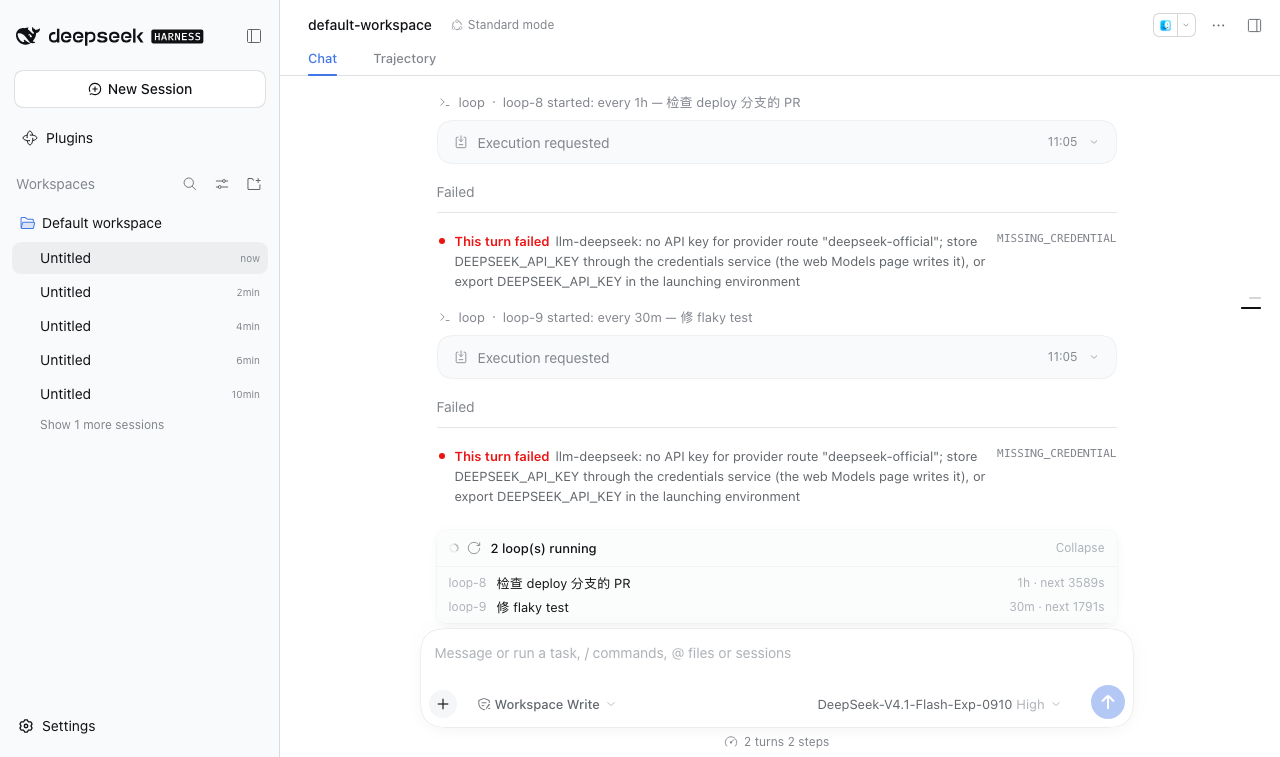
Features
Tool (registered via defineTool, the model can self-adjust on every turn):
| Tool | Description |
|---|---|
loop | start (start a new loop) / stop (stop a specific one or all) / status / list (list loops in the current session) |
Commands (user side):
| Command | Description |
|---|---|
/loop [interval] <prompt> | Start a new loop (interval 5m/30s/1h/2d or a bare number = minutes; bare /loop uses the built-in maintenance prompt) |
/loop list | List all loops in the current session (with ids) |
/loop stop <id> / /loop stop | Stop a specific loop / stop all |
/loop replies (the command-palette description, list / usage / stop output) follow the UI language: the client half relays its active locale to the plugin, so they render in Chinese or English to match the interface. Headless runs with no client in sight keep English.
UI (dock slot above the input box on the chat page):
| Feature | Description |
|---|---|
| Active status bar | Single loop: ● ⟳ looping · <prompt> · 5m · next in 23s; multiple loops collapse into a count bar "N loops running · expand", click to expand the list |
Settings
The plugin ships a settings card on Settings → Plugins → this bundle's page (official plugins.bundle.config slot, keyed by the bundle package name @vlln/dsh-loop; the settings namespace is dsh-loop, the id of the entry that exports the Config schema). Each tool gets its own row with an official-looking Switch:
| Setting | Default | Effect |
|---|---|---|
Whether to inject the loop tool into the model | on | When off, the loop tool is not registered for agents: the model can no longer see or call it (tools.schemas has no loop). The /loop command (user side) and the status bar are unaffected. |
The card fields are driven by the client LOOP_TOOL_FIELDS table, mirrored one-to-one by the Node-side tool definition table — adding a tool means adding one entry on each side, and the settings card grows a new switch row automatically.
Changes apply as soon as you save (the schema's leaves are marked .volatile(): the host commits in place without remounting the entry and emits loader/volatile-update) — the plugin re-reads the snapshot and registers/unregisters the affected tools on the fly, so new sessions pick it up without a restart. Tool schemas are resolved live at every session/prompt assembly (there is no per-session snapshot): in-flight sessions also see the change from their next turn, and turning a tool off drops it from tools.schemas immediately, so a model that called it earlier can no longer reach it (they can only reconcile that through the turn record). The /loop command (user side) and the status bar are unaffected.
Installation
Recommended: one-line install from a git source (build artifacts are committed, so a git source does not trigger a build):
dsh plugin --profile web add "github:vlln/dsh-loop#main"   # one-line git source (build artifacts committed)
# or npm source: dsh plugin --profile web add @vlln/dsh-loop@0.3.0
Or from a local directory (when you have the source): git clone, then cd dsh-loop && dsh plugin --profile web add ..
After installing, restart web for it to take effect (bundles are composed at startup); afterwards you can disable/enable it from the "Plugins" panel on the settings page (takes effect at runtime + persisted).
Usage
# User side
/loop 5m check PRs on the deploy branch   # delivered every 5 minutes
/loop list                                # loop-1: every 5m — check PRs on the deploy branch
/loop stop loop-1                         # stop a specific one
/loop stop                                # stop all

# Model side (loop tool)
loop action=start prompt="fix flaky test" interval="2m"
loop action=status
loop action=stop loop_id="loop-2"
Loops live in the current harness process and disappear when the process exits (not persisted across restarts, consistent with Claude Code /loop).
Development
pnpm install
pnpm run build      # tsdown: Node half (lib/index.mjs) + client bundle (lib/client.js)
- Node half:
src/index.mjs(commands/tool/loops status route/plugins/dsh-loop/loops) - client:
src/client/index.tsx(dock slot status bar)
License
MIT License (example plugin of the DSH ecosystem).


