
dsh-solution-explorer
UI & Experiencexiaoksio/dsh-solution-explorer
Right-sidebar plugin for DSH Web GUI: VS Code-style file explorer with source control (git status, stage/unstage, commit, diff, commit graph, sync, branch/remote management) and editable diff view.
- code-editor
- deepseek-harness
- deepseek-harness-plugin
- developer-tools
- diff-viewer
- dsh-plugin
- file-explorer
- git
- git-gui
- sidebar
- source-control
README
dsh-solution-explorer
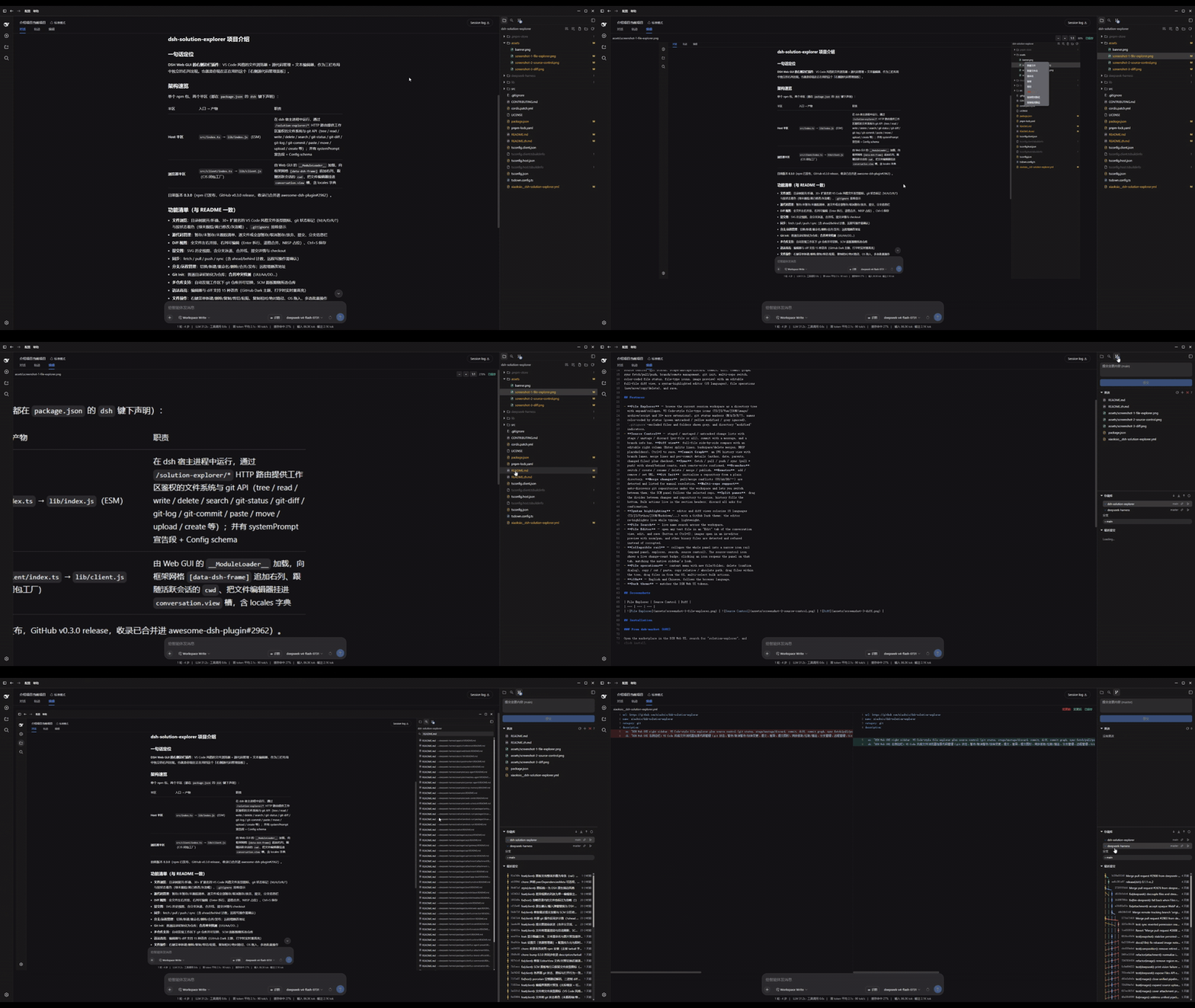





Right-sidebar plugin for the DSH Web GUI: a VS Code-style file explorer plus source control (git status, stage/unstage/discard, commit, diff, commit graph, sync fetch/pull/push, branch/remote management, git init, multi-repo switch, color-coded file status, file-type icons, image preview) with an editable full-file diff view, a syntax-highlighted editor (15 languages), file operations (new/move/copy/delete), and save.
Features
- File Explorer — browse the current session workspace as a directory tree
with expand/collapse, VS Code-style file-type icons (TS/JS/Vue/JSON/image/
archive/script and 30+ more extensions), git status markers (M/A/D/R/?), names
color-coded by status (green untracked / yellow modified / grey ignored),
.gitignore-excluded files and folders shown grey, and directory "modified" indicators. - Source Control — staged / unstaged / untracked change lists with stage / unstage / discard (per-file or all), commit with a message, and a branch info bar. Diff view: full-file side-by-side compare with an editable right column (Enter splits lines, backspace/delete merges, NBSP placeholders), Ctrl+S to save. Commit Graph: an SVG history view with branch lanes, merge lines and per-commit details (author, date, parents, changed files) plus checkout. Sync: fetch / pull / push / sync (pull + push) with ahead/behind counts, each remote-write confirmed. Branches: switch / create / rename / delete / merge / publish. Remotes: add / remove / set URL. Git Init: initialize a repository from a plain directory. Merge changes: pull/merge conflicts (UU/AA/DD/…) are detected and listed for manual resolution. Multi-repo support: auto-discovers git repositories under the workspace and lets you switch between them; the SCM panel follows the selected repo. Split panes: drag the divider between changes and repository to resize, history fills the bottom. Bulk actions live in the section headers; discard all asks for confirmation.
- Syntax highlighting — editor and diff views colorize 15 languages (TS/JS/Python/JSON/Markdown/...) with a GitHub Dark theme; the editor re-highlights live while typing, lightweight.
- File Search — live name search across the workspace.
- File Editor — open any text file in an "Edit" tab of the conversation view, edit, and save (button or Ctrl+S); images open in an in-editor preview with zoom/pan, and other binary files are detected and refused instead of corrupted.
- Collapsible rail — collapse the whole panel into a narrow icon rail (expand panel, explorer, search, source control). The source-control icon shows a live change-count badge; clicking an icon reopens the panel on that tab, matching the native sidebar's look.
- File operations — context menu with new file/folder, delete (confirm dialog), copy / cut / paste, copy relative / absolute path; drag files within the tree, drag files in from the OS, multi-select bulk actions.
- i18n — English and Chinese, follows the browser language.
- Dark theme — matches the DSH Web UI tokens.
Screenshots
| File Explorer | Source Control | Diff |
|---|---|---|
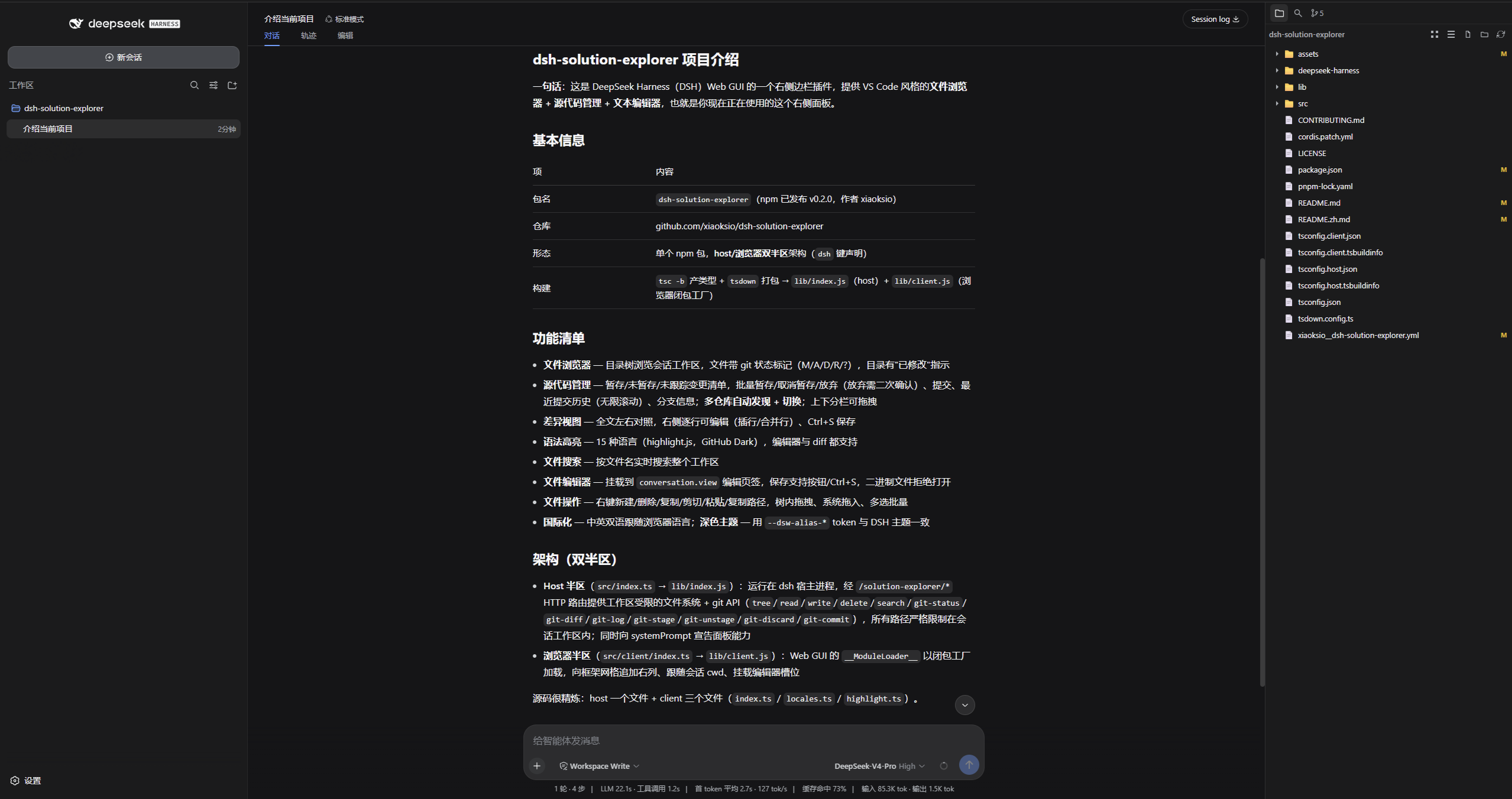 | 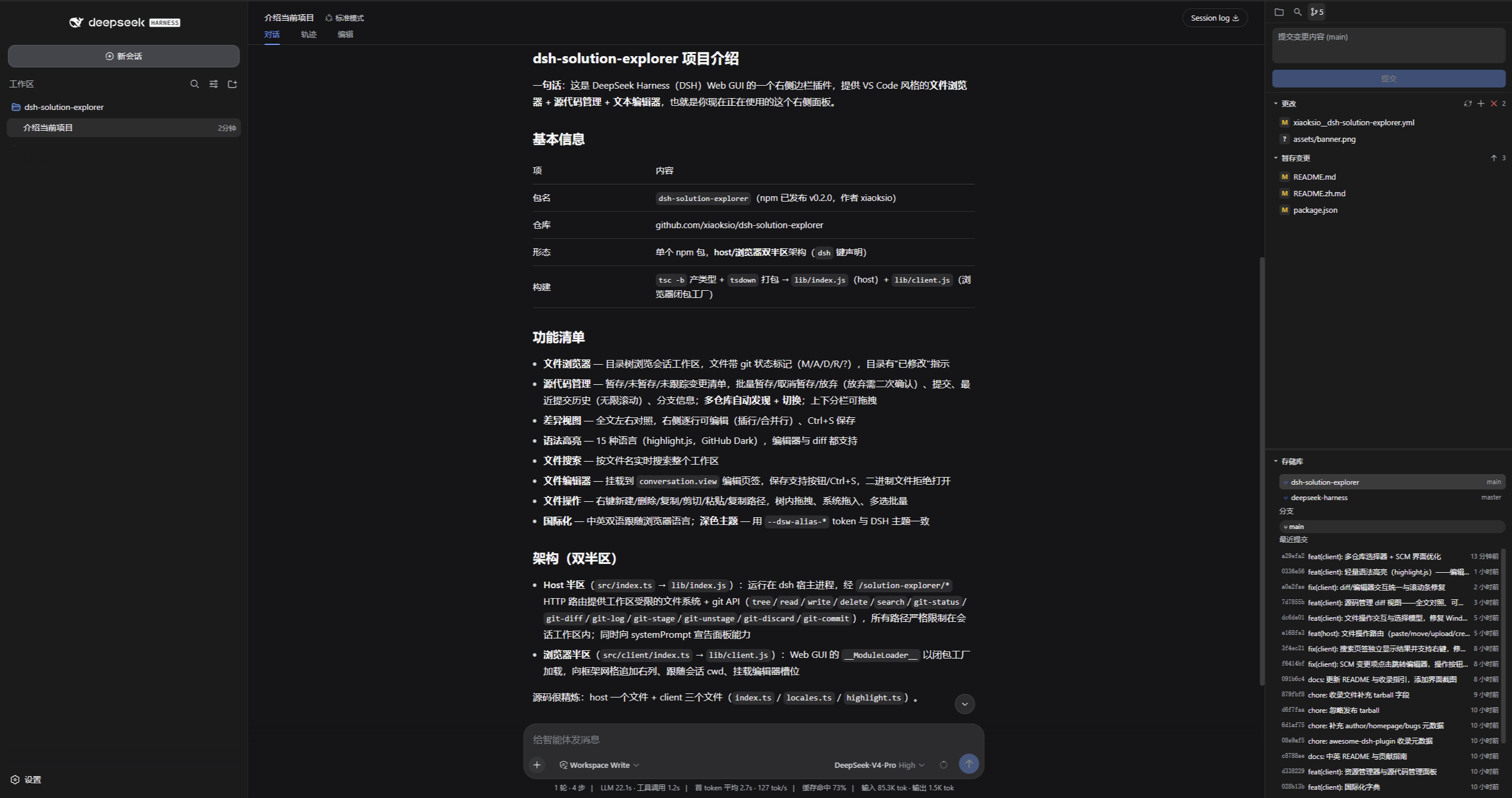 | 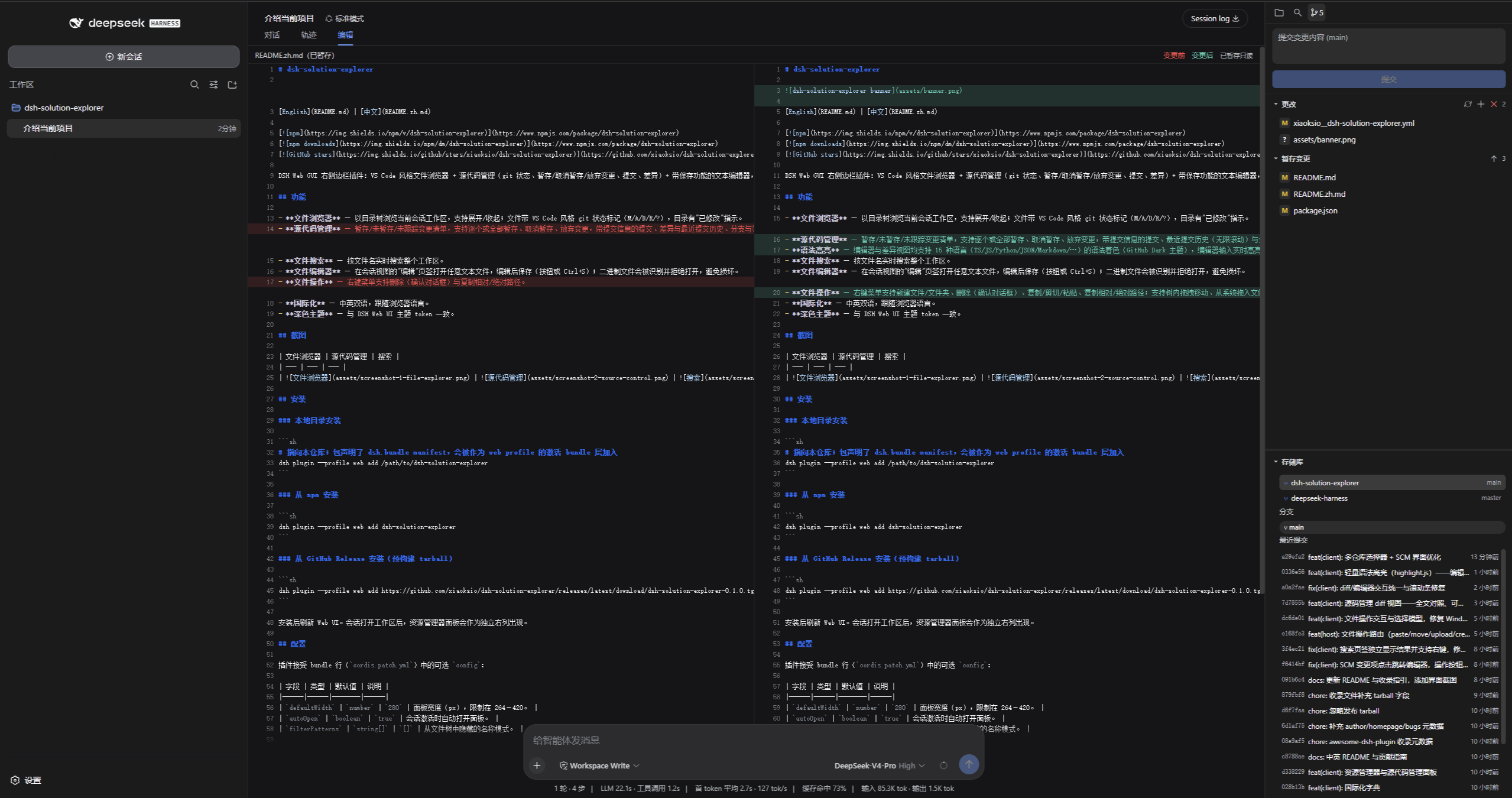 |
Installation
From dsh-market (GUI)
Open the marketplace in the DSH Web UI, search for "solution-explorer", and click install.
From npm
dsh plugin --profile web add dsh-solution-explorer
From a local checkout
dsh plugin --profile web add /path/to/dsh-solution-explorer
After installing, reload the Web UI. The explorer panel appears as its own right column once a session with a workspace is active.
Configuration
The plugin accepts an optional config in the bundle row
(cordis.patch.yml):
| Field | Type | Default | Description |
|---|---|---|---|
defaultWidth | number | 280 | Panel width in px, clamped to 264–560. |
autoOpen | boolean | true | Auto-open the panel when a session activates. |
filterPatterns | string[] | [] | Name patterns to hide from the file tree. |
showHidden | boolean | false | Show dot-prefixed (hidden) files in the tree. |
Development
pnpm install
pnpm build    # tsc declarations + tsdown bundles (lib/index.js, lib/client.js)
pnpm watch    # rebuild on change
See CONTRIBUTING.md for the submission guide.
pnpm install also runs the prepare script, so a git-based install
(dsh plugin add github:xiaoksio/dsh-solution-explorer) builds lib/ on
the target machine without manual steps.
How it works
The plugin is a single npm package with two halves, both declared in
package.json under the dsh key:
- Host half (
src/index.ts, exports.→lib/index.js): runs in the dsh host process and serves the workspace-gated filesystem and git API over HTTP routes under/solution-explorer/*(tree,read,write,delete,search,git-repos,git-status,git-diff,git-log,git-stage,git-unstage,git-discard,git-commit,paste,move,upload,create). All routes resolve paths strictly inside the session workspace root. It also announces itself in the system prompt so the agent knows what the panel can do. - Browser half (
src/client/index.ts, exports./client→lib/client.js): loaded by the Web GUI's__ModuleLoader__as a closure-factory bundle. It appends the explorer column to the frame grid ([data-dsh-frame]), follows the active session'scwd, and mounts the file editor into theconversation.viewslot.
See CONTRIBUTING.md for development conventions and how to submit the plugin to awesome-dsh-plugin.
License
MIT