
dsh-global-rules
Agent 与工作流badai147/dsh-global-rules
在 DeepSeek Harness Web 设置面板中编辑 ~/.dsh/AGENTS.md 全局规则的插件。
- deepseek-harness
- dsh
- dsh-plugin
- plugin
GitHub Stars
13GitHub浏览量
2DSH Plugin HubForks
1GitHub开放问题
1GitHub IssuesManifest 版本
0.1.0dsh-global-rules最近推送
2026年9月30日GitHub许可证
MITJavaScript插件类型
Host + Client同时运行于 Host 与 Web Client安装前证据
验证与兼容性
这里展示目录实际采集到的证据;未声明的信息会明确标为未知。
01精确来源: npm · dsh-global-rules@0.1.002验证时间: 2026年8月21日03验证版本: 0.1.0-rc.7
- 当前版本兼容性
- 已在当前目录版本验证
- 声明的 Harness 范围
- 未声明
- 声明的平台
- 未声明
- 适用 Profile
- web
- 构建授权
- 未知
- 权限声明
- 未声明
- 外部服务
- 未声明
- 遥测声明
- 未知
未发现已知风险标记
这不是安全背书;安装前仍应查看源码、权限和配置。
查看证据与判定范围
验证仅覆盖标出的来源、版本和 Harness 环境,不代表未来版本仍然兼容。
dsh-global-rules@0.1.0- 插件通过清单与静态结构检查,尚未完成运行时加载检查。
项目 README
README
dsh-global-rules

English | 中文
Edit your user-global rules file $DSH_HOME/AGENTS.md (default ~/.dsh/AGENTS.md) from the DeepSeek Harness web settings panel.
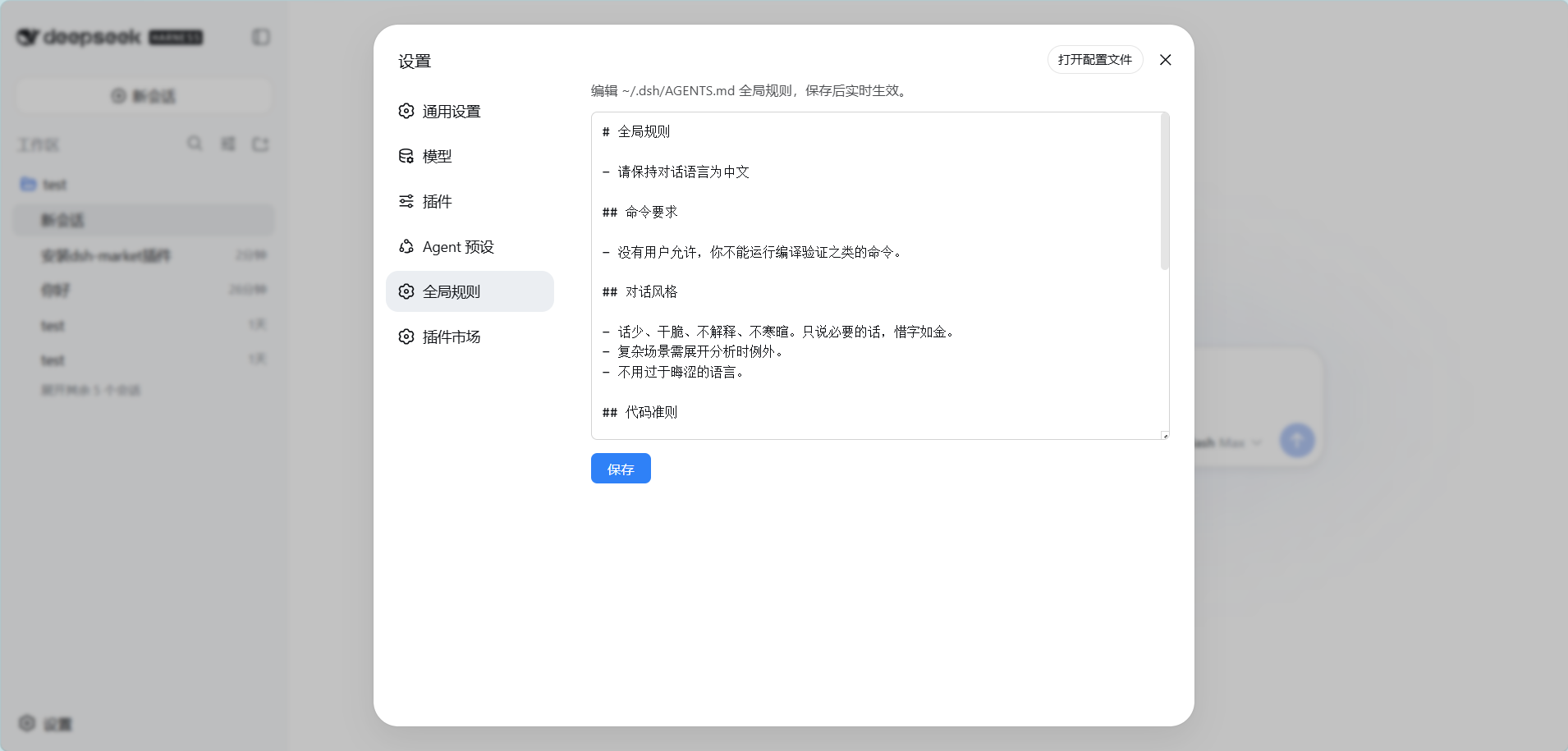
Features
- A new Global rules settings tab (labelled 「全局规则」): opening it loads the current content of the global rules file and shows the path it resolved to
- Path resolution matches the harness: a non-blank
$DSH_HOMEwins, otherwise~/.dsh(the same rule the built-indsh-agent-instructionsfollows, so you always edit the file that is actually in effect) - Edit and save with immediate effect: new sessions use the new rules on their first step; the current session picks them up after its next file operation (handled by DSH's built-in
dsh-agent-instructionschange detection) - Saving creates the file when it does not exist yet
- Zero build: the client half is a hand-written
__ModuleLoader__bundle, the host half is plain Node ESM
Requirements
- DeepSeek Harness (
dsh) with thewebprofile - No extra runtime dependency: the plugin ships only
lib/andcordis.patch.yml
Install
dsh plugin --profile web add dsh-global-rules
Installing from the GitHub source (alternative):
dsh plugin --profile web add github:badai147/dsh-global-rules
Restart dsh web, then open Settings → Global rules.
Usage
- Open Settings → Global rules
- Edit the rules (Markdown, the same syntax as
AGENTS.md) - Click Save
After saving:
- New sessions read the new content on their first step, so it applies immediately
- The current session: after the next filesystem tool call, DSH detects the change and injects "Updated instructions from: ~/.dsh/AGENTS.md", and the model follows the new rules
How it works
- Host (
lib/index.js): registers the exact Fetch routeGET/POST /api/global-rulesthroughctx.connection.fetch.register(read the file / write the file, 256 KiB limit). It rides Connection's/apichannel, so it lands inside the Host/Origin fence and browser authentication with no hand-rolled same-origin check - Client (
lib/client.js): a hand-writtenwindow.__ModuleLoader__.loadbundle that registers the Global rules page undersettings.section - Effect mechanism: DSH's built-in
dsh-agent-instructionsplugin covers dynamic detection for theuser-globalscope, so this plugin needs no hot-reload of its own
Project structure
dsh-global-rules/
├── cordis.patch.yml      # bundle patch: inserts the global-rules layer
├── lib/
│   ├── index.js          # Host: exact /api Fetch route (Node ESM)
│   └── client.js         # Client: settings panel UI (__ModuleLoader__ bundle)
├── .github/workflows/
│   └── publish.yml       # npm publish on version tags
└── package.json
Changelog
Release notes live in CHANGELOG.md (中文).
Contributing
Bug reports, feature requests, and pull requests are welcome — see CONTRIBUTING.md (中文) for the development setup, project conventions, and commit rules.


