
dsh-remote
连接与集成flymysql/dsh-remote
DeepSeek Harness 远程工作助手:通过 SSH 连接,选择远程工作区,使用 rw_* 工具操作,并通过 SFTP 镜像到本地 DSH 工作区。
- deepseek-harness
- dsh
- dsh-plugin
- remote
- sftp
- ssh
- tunnel
- workspace
验证与兼容性
这里展示目录实际采集到的证据;未声明的信息会明确标为未知。
- 当前版本兼容性
- 已在当前目录版本验证
- 声明的 Harness 范围
- 未声明
- 声明的平台
- 未声明
- 适用 Profile
- web
- 构建授权
- 未知
- 权限声明
- 未声明
- 外部服务
- 未声明
- 遥测声明
- 未知
这不是安全背书;安装前仍应查看源码、权限和配置。
查看证据与判定范围
验证仅覆盖标出的来源、版本和 Harness 环境,不代表未来版本仍然兼容。
dsh-remote@0.8.7- 插件通过清单与静态结构检查,尚未完成运行时加载检查。
README
English · 中文
dsh-remote





由 @flymysql 维护 · 主页 · 用量统计 · 博客 · 讨论区 · Issue · English
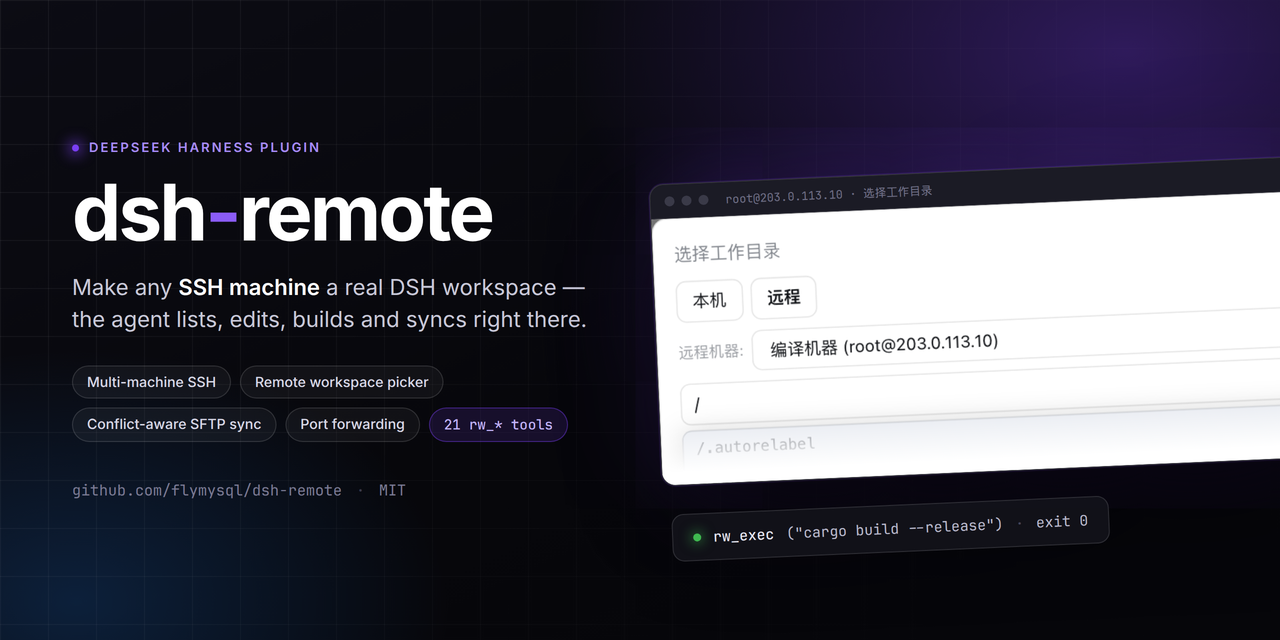
为 DeepSeek Harness(DSH)打造的远程工作助手。
维护多台 SSH 机器,然后在「选择工作区」时选一个远程工作区(或本地工作区),Agent 就能在不离开 harness 的情况下直接操作——列文件、读代码、在远程主机上跑构建/命令,并把远程目录镜像成一个真实的本地工作区对象。
DSH 的 Web 界面刻意只监听 127.0.0.1(CLI 为安全拒绝 --host 0.0.0.0)。本插件反过来:由你主动连出到你维护的机器,选一个工作区,然后通过 DSH 原生的工作区 + 文件流来工作——不改动 dsh-workspace 核心。
反过来也成立:你可以把远端那台机器的 DSH 网页界面,当成本机浏览器里的一个页面打开——同样不需要在远端开放任何端口(详见 在本地打开远程机器上的 DSH 界面)。连不上时还有一键体检与部署,它会替你把远端环境修好并验证。
界面预览
设置 → 远程工作区 —— 多机列表、高级配置(私钥/跳板机/agent)、连接体检、远程 DSH 界面、端口转发、审计日志、更新:
原生 「Add workspace / 选择工作区」 流程 —— 居中弹窗、两个 tab,默认落在「本机」;切到**「远程」**:
- 路径框实时补全;Windows 主机根级显示「此电脑」多盘视图;「浏览…」浮层选中只回填、不直接提交。
- 确定后创建真实本地镜像并被 harness 收养,同时通过 SFTP 保持同步;所选工作区持久化到该机器。
功能
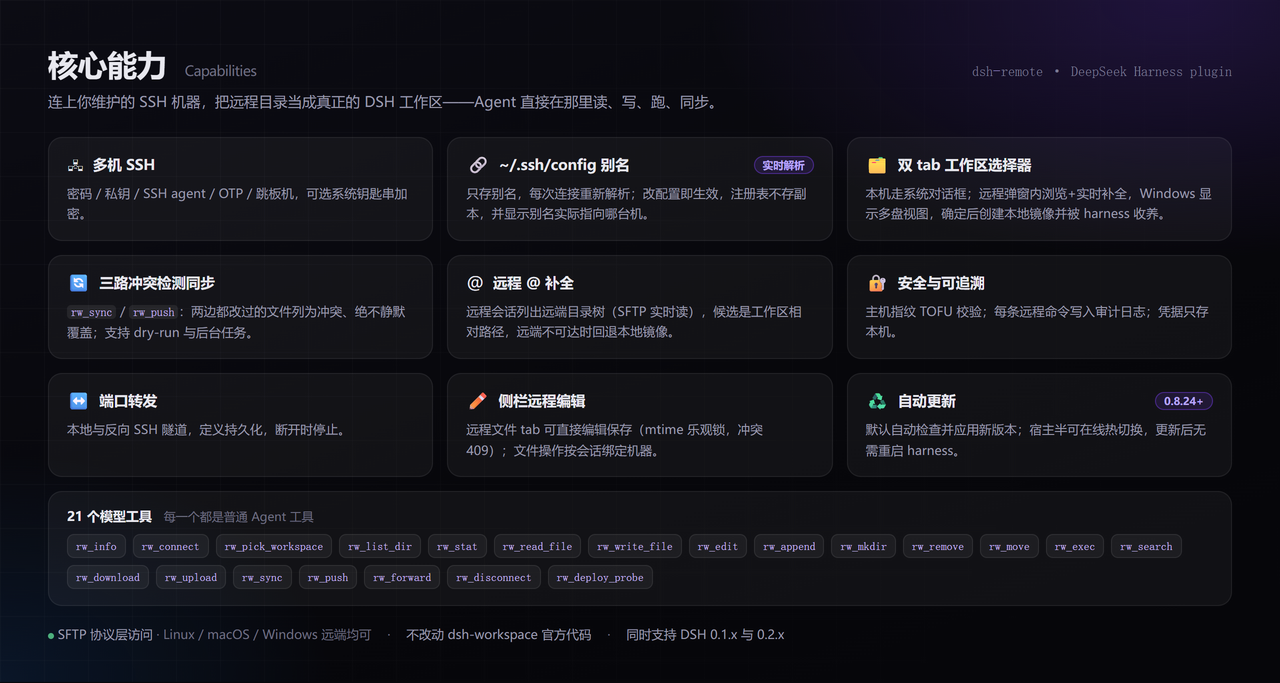
上图是能力总览;下面只列上图没说清、但用起来需要知道的部分。
其余要点:
- 22 个模型工具(便于复制/检索):
rw_info、rw_connect、rw_machines、rw_pick_workspace、rw_list_dir、rw_stat、rw_read_file、rw_write_file、rw_edit、rw_append、rw_mkdir、rw_remove、rw_move、rw_exec、rw_search、rw_download、rw_upload、rw_sync、rw_push、rw_forward、rw_disconnect、rw_deploy_probe。 - 会话列表里区分本地/远程(
0.8.43+)—— 远程会话的行首有一个绿点,悬停显示user@host:port与远端路径;打开该会话后,标题栏还会常显一个主机标签(本地会话两者都没有)。判定只看会话 cwd 是否落在$DSH_HOME/remote-workspaces/…镜像里,所以「保存过但没在用」的机器不会给本地会话打标。 - 把远端机器的 DSH 界面挂到本机(
0.8.36+)—— 不用在远端开任何端口:插件主动 SSH 连过去,在远端只监听127.0.0.1地起一个dsh web,再把端口经隧道搬回本机的一个 loopback 端口。地址带一次性登录令牌,只在本机这次跳转里用一次。 - 连不上时一键体检与部署(
0.8.36+)—— 连不上大多不是插件的问题,而是远端 dsh 的版本或环境不对。体检(只读)会报出平台/node/npm/dsh 版本、原生模块能否启动、代理与 npm 源,并给出修复建议;「部署并验证」把它装到远端私有目录(不写系统目录、不改 PATH、不覆盖你在用的版本,删目录即回滚)并逐步校验。按钮不再需要先体检——直接点即可(0.8.40+),部署过程自己会重新体检。失败还能交给内置的dsh-remote-deploy技能排查。 - 远端跨平台 —— 文件访问走 SFTP 协议层(不依赖 POSIX shell),Linux/macOS/Windows 远端都能列/读/写/搜索/同步。
- Windows 主机 —— 自动探测平台并定位 Git Bash,命令经
bash -s走 stdin 执行,不受引号/反斜杠转义困扰(config.shell可指定或设native关闭);C:\Users\dev与/c/Users/dev两种写法都接受。 - 长任务异步化 ——
rw_sync/rw_push传async: true返回taskId,可查询进度/结果/取消。 - 数据跟随 Harness 根目录 —— 机器清单与镜像在
$DSH_HOME/remote-workspaces;0.6 之前的数据首次启动自动迁移。 - 不改动
dsh-workspace官方代码 —— 全部作为普通插件实现。
安装
DSH 版本兼容性
同时支持 0.1.x 与 0.2.x 两条 DSH 线。DSH 会在导入 bundle 之前校验所有 @deepseek-ai/dsh-* 的 peer 范围,任一条不匹配就整包丢弃(没有设置页、没有 rw_* 工具):
dsh: skipping profile bundle "dsh-remote": Error: Plugin dsh-remote@… is incompatible …
caret 在 0.x 上会锁死小版本线(^0.1.x 容不下 0.2.x,反之亦然),所以自 0.8.29 起改为跨线区间 >=0.1.0-rc.6 <0.3.0。低于 0.8.29 请在升级 DSH 前先升级本插件。
官方 Desktop 兼容适配(实验性)
对 DeepSeek 官方 Desktop 的适配(以 0.1.5-rc.2 Host 协议验证,不修改 Harness 核心):
- 经
ctx.connection.fetch注册/api/dsh-remote/*,由 Desktop 的dsh-app:通道承载,不启动 Web Server。 - 经
sidebarRightTabs提供原生「远程文件」入口,不把远端路径传给本地预览器。 dsh-better-sidebar不再内置;官方 Desktop 用原生右侧栏,不需要它。
已验证 Host 启动、IPC 请求、真实 SSH 的只读连接/列目录/读文件,以及双机会话路由(侧栏 /ls /read /write /fs 带 sessionId 时按会话选机)。原生文件 tab 的完整 GUI、失败/取消交互、非 macOS 宿主仍属实验性。Desktop 安装器可能需为 ssh2 / cpu-features 可选构建脚本配置策略。
已发布的 Web bundle
dsh plugin add dsh-remote
自 v0.8.18 起只安装并挂载自身;Web 侧边栏(dsh-better-sidebar)改为可选。需要 Web 版远程文件浏览/编辑时再单独装它;不装时 rw_* 工具、设置页、同步、审计与转发均照常工作。
从 0.7.2–0.8.17 升级: 内嵌侧边栏会消失,旧 profile 里
id: dsh-remote-sidebar的覆盖可以删除。
(或 npm install dsh-remote,再在 cordis.patch.yml 加 - id: dsh-remote / name: dsh-remote。)
快速上手
- 加一台机器 —— 设置 → 远程工作区 → 填 host/port/user + 密码或 key → 设为当前。
保存 ≠ 激活:保存只是备用连接;只有「设为当前」(或 Agent 调
rw_connect)才进入会话的 remote context。 - 选工作区 —— 点侧边栏/会话的 Add workspace:
- 本机 → 系统文件夹选择(或手输路径)→ 本地工作区。宿主没有可用系统对话框时改用插件内置浏览器。
- 远程 → 选机器 → 浏览到远程目录(或输入
/path)→ 「设为远程工作区」⇒ 创建并收养本地镜像工作区。
- 让 Agent 工作 —— 当作普通工作区使用,例如
rw_read_file/rw_write_file/rw_edit/rw_exec/rw_search/rw_sync/rw_push/rw_forward(完整列表见上文)。
Remote context 是 session 级的:只有当前 session 的工作区是某个远程镜像时,system prompt 才注入「Remote workspace」段落;普通本地 session 不受影响,模型也不会主动调
rw_*。
在本地打开远程机器上的 DSH 界面
远程机器上那个 dsh web 也可以当成本机的一个页面打开(issue #46)。方向仍然是「本地主动连出去」:
远端不需要开放任何端口。DSH 刻意拒绝
--host 0.0.0.0(它会把远程代码执行能力暴露到网络上), 所以正确的做法是由本机 SSH 连过去,在远端只监听 127.0.0.1 地起一个dsh web, 再把它的端口经 SSH 隧道搬回本机的一个 loopback 端口。
用法:设置 → 远程工作区 → 「远程 DSH 界面」 → 选一台机器 → 连接并打开。 浏览器会新开一个标签页,显示的就是那台远端机器的完整 DSH 界面(聊天、工具树、设置都在)。
- 界面地址形如
http://127.0.0.1:3088/?token=…。那个 token 是远端进程启动时打印的一次性凭据, 只在本机的这次跳转里用一次:DSH 会把它换成 30 天有效的签名 cookie 并跳转到干净的/。 请不要把这个带 token 的地址外发。 - 「断开」只关隧道,不会杀掉远端进程(它可能是你在别处也在用的实例); 要连远端进程一起停,用「断开并停止远端」——它只会结束本次由插件启动的那个进程。
- 若远端已经在跑一个界面(比如你自己在终端里起的),可以选机器后把它的
http://127.0.0.1:<端口>/?token=…粘进输入框,点「连接已有实例」,插件不会再去启第二个。 - 远端
dsh不在 SSH 登录 PATH 时,用webAttachCommand指向它的绝对路径; 想让它别污染远端用户自己的会话/设置,用webAttachDshHome指一个临时目录。
连不上?先体检,再一键部署
连不上大多不是插件的问题,而是远端 dsh 的版本或环境不对。 最典型的一种:dsh 0.1.0-rc.6
依赖 node-pty@1.1.0,而那个版本发布的包里没有 linux-x64 预编译产物 ⇒ dsh web
在 Linux 上根本起不来。这种情况以前只能看到「没拿到启动令牌」,无从判断。
设置 → 远程工作区 → 「远端 dsh 体检与部署」:
- 体检(只读) —— 探测远端平台/node/npm/dsh 版本/原生模块能否启动/是否认识
--no-open/代理与 npm 源,给出结论与修复建议。不写任何东西,可以随便点。 - 部署并验证 —— 只在上一步判定「需要且可以自动装」时才出现。它会装到远端
私有目录(默认
~/.dsh-remote/dsh):不写系统目录、不改 PATH、不覆盖你在用的版本, 删掉那个目录即完全回滚。装完逐步校验(二进制 / 原生模块 /web子命令), 成功后按机器记住这条 dsh 路径,之后连接就用它。 - 让 AI 排查 —— 只在失败后出现。它会创建一个会话,让内置的
dsh-remote-deploy技能去处理确定性流程覆盖不到的长尾(没有 npm、要 sudo、代理、内网镜像源、Windows 远端等)。 只有你点它才会创建,因为这会消耗模型额度。
相关配置:webInstallPrefix(装哪,默认 $HOME/.dsh-remote/dsh)、
webInstallVersion(装哪个版本,默认 0.1.5-rc.2——第一个在 Linux 上能起 web 的版本)、
webInstallRegistry(npm 源;留空则沿用远端自己的配置,不会覆盖你的内网镜像)。
可选:CLI 默认机
可在 cordis.patch.yml 提供默认机:
# 示例:请换成你自己的机器
- id: dsh-remote
  name: dsh-remote
  config:
    host: 203.0.113.10   # 或你的真实主机 / hostname
    port: 22
    username: dev
    privateKeyPath: ~/.ssh/id_rsa
    # 或用密码登录:
    # password: '…'
    workspace: ~/project
若 host 为空,插件启动时处于断开状态,在 UI 里配置机器即可。
常用命令(安装 / 查看 / 启动)
DSH 的 dsh 可能不在某些 shell 的 PATH(比如 Windows PowerShell 里在某个仓库目录下),所以同时列出 dsh 与 npx 两种写法。操作都要用 --profile <name> 指定 profile(一般 web):
# 安装(从 npm 拉到 profile)
dsh plugin --profile web add dsh-remote
# 同一效果:当 `dsh` 不在 PATH 时用 npx
npx --yes @deepseek-ai/dsh plugin --profile web add dsh-remote

# 确认已装
dsh plugin --profile web list
npx --yes @deepseek-ai/dsh plugin --profile web list

# 启动 web 界面(重载 profile,新插件在启动时生效)
dsh --profile web
npx --yes @deepseek-ai/dsh --profile web   # 访问 http://127.0.0.1:3080

# 迭代用本地源码替换 npm 版(便于改 dsh 插件代码后即测)
npx --yes @deepseek-ai/dsh plugin --profile web add D:/path/to/dsh-remote
npx --yes @deepseek-ai/dsh plugin --profile web remove dsh-remote   # 恢复用发行版
启动成功后,设置 →「远程工作区」会出现;「Add workspace」流程会带「本机 / 远程」两个 tab(见上方效果图)。
开发(沙箱优先,勿改产品)
迭代一律在沙箱里做——手工改产品 profile 会被插件管理器在重装时还原:
scripts/dev-run.sh --restart   # 启动 / 重启隔离沙箱
scripts/dev-run.sh --stop      # 停止
scripts/dev-run.sh --status    # 是否在运行
- 沙箱自带独立 DSH 实例(仓库内
dev-harness/harness),UI 在http://127.0.0.1:50599。 - 宿主半(
lib/index.js)改动需--restart;客户端半(lib/client.js)改动刷新页面即可。 - 脚本用硬链接拷贝把
lib/放进沙箱而非软链——软链会破坏@deepseek-ai/*的解析。 - 提交前跑
node check.mjs(框架约束闸门)与npm test;scripts/boot-smoke.sh证明插件仍能启动。 - 完整规则见
scripts/dev-standards.md。
部署到产品 profile 是单独的受控动作(./sync.sh),只在确定要发布时做。
配置
| 键 | 类型 | 默认 | 说明 |
|---|---|---|---|
host | string | '' | 默认 SSH 主机(空=断开) |
port | int | 22 | 默认 SSH 端口 |
username | string | '' | 默认 SSH 用户 |
password | string | '' | 默认 SSH 密码(非空覆盖 key) |
privateKeyPath | string | '' | 私钥路径(仅在显式提供时使用) |
passphrase | string | '' | 加密私钥的 passphrase |
workspace | string | '' | 默认远程工作区路径 |
shell | string | '' | 远程命令终端策略:''=自动检测(Windows 找 Git Bash)、'git-bash'=优先 Git Bash、'native'=不包装、其他=显式 bash.exe 路径(如 C:\Program Files\Git\bin\bash.exe) |
commandTimeoutMs | int | 20000 | 单条远程命令超时 |
connectTimeoutMs | int | 15000 | SSH 连接超时 |
maxOutputChars | int | 200000 | 单条远程命令捕获的 stdout/stderr 上限 |
maxFileBytes | int | 52428800 | 镜像同步时跳过超过该大小的文件(0=不设上限) |
hostKeyMode | string | accept-new | 主机指纹策略:accept-new(首次信任)、verify(拒绝未知主机)、off(跳过校验) |
useAgent | bool | false | 用 OpenSSH agent(SSH_AUTH_SOCK)认证 |
keyboardInteractive | bool | false | 允许 keyboard-interactive 认证(OTP/MFA)并复用配置的密码 |
proxy | object | — | 跳板机:{ host, port?, username?, password?, privateKeyPath? } |
autoPush | bool | false | 镜像内文件被编辑后自动推回远端(watcher,带防抖) |
auditLog | bool | true | 把执行的命令追加到 $DSH_HOME/remote-workspaces/audit.log |
encoding | string | utf-8 | 远程文件读写的文本编码(如 gbk) |
fileReference | bool | true | 远程 @ 补全:远程会话的 @ 列出远端目录树(issue #39);关闭则只有本地镜像 |
fileReferenceMaxResults | int | 20 | 一次 @ 查询最多返回多少候选 |
fileReferenceMaxEntries | int | 3000 | 一棵远程工作区索引最多保留多少条目 |
fileReferenceExcludedDirectories | string[] | [.git, node_modules, dist, build, out, coverage, target, .next, .nuxt, .turbo, .venv, __pycache__, .pytest_cache, .mypy_cache, .gradle] | 远程 @ 遍历跳过的目录名 |
fileReferenceTimeoutMs | int | 4000 | 一次远程索引遍历的墙钟预算(超时用已扫到的部分结果,不让光标等) |
searchTimeoutMs | int | 60000 | rw_search 的协作式预算(ms):既作为工具声明的 timeoutMs 交给 DSH 的 timeout-policy,也是搜索自身的墙钟上限;到点返回部分结果并标 TRUNCATED(issue #44)。 |
searchMaxEntries | int | 50000 | rw_search 在返回部分结果前最多扫描多少个文件。 |
updateMode | string | auto | 自更新模式:auto=加载时及每 6 小时检查并自动应用、manual=仅在手动检查时查、off=完全不查。0.8.27 起默认 auto——之所以现在才安全,是因为 0.8.24 补上了宿主半热切换 |
updateCheckIntervalMs | int | 21600000(6h) | auto 模式检查 npm 的间隔(下限 60000) |
updateAutoReload | bool | true | 更新落地后自动热切换宿主半;false 则留到下次启动,设置页会显示 pendingReload |
webAttachPortStart | int | 3088 | 「远程 DSH 界面」在本机监听的起始端口(占用则顺延,仅监听 127.0.0.1) |
webAttachCommand | string | dsh | 在远端启动 dsh web 用的命令;远端 dsh 不在 SSH 登录 PATH 时改这里 |
webAttachDshHome | string | '' | 远端启动时导出的 DSH_HOME;留空则复用远端用户自己的 harness home |
webAttachWaitSeconds | int | 45 | 等待远端 dsh web 打印启动令牌的秒数 |
webInstallPrefix | string | '' | 自动部署装到远端的哪个目录;留空用 $HOME/.dsh-remote/dsh(不写系统目录、不改 PATH) |
webInstallVersion | string | 0.1.5-rc.2 | 自动部署安装的 dsh 版本;默认值是第一个在 Linux 上能启动 web 的版本 |
webInstallRegistry | string | '' | 安装用的 npm 源;留空沿用远端自己的配置,不会覆盖内网镜像 |
权威清单是
lib/index.js里的Configschema,本表与之一致。
常见问题 / 排查
@ 能列出远程文件,但内置读文件工具打不开 —— harness 自带工具看到的是本地镜像,要等 rw_sync 下载后才有内容。读远程文件请用 rw_read_file 或侧栏远程文件 tab。
主机指纹变了 —— /remote forget-key(或设置页 → 机器 → 重新信任)。
连接报「认证失败」 —— 检查用户名/密码/私钥路径;加密私钥要填 Passphrase;需要动态码时勾选 keyboard-interactive。
连不上内网机器 —— 填「跳板机」主机(也可先把跳板机本身配成一台机器)。
rw_sync/rw_push 报冲突 —— 两边都改过的文件会被跳过并列出(绝不静默覆盖);手动合并后重试,或用 force=true 以一边为准。
Windows 远程 —— 全部走 SFTP,不依赖 POSIX shell;中文文件用 encoding=gbk。
镜像里缺目录 —— 默认 ignore 会跳过 .git/node_modules 等;在 $DSH_HOME/remote-workspaces/.dsh-remote-ignore 调整(gitignore 语法)。
保存远程文件报 409 —— 打开后远端已被改动,重新读取再编辑。
密码怎么加密保存 —— 勾选「加密保存密码」:macOS 钥匙串 / Windows DPAPI / Linux secret-tool(libsecret);后端不可用时回退明文。
升级后插件整个不见了 —— DSH 兼容性判定丢弃了 bundle,升到 0.8.29+ 即可(见上文「DSH 版本兼容性」)。
「远程 DSH 界面」连不上/一直转圈 —— 先确认那台机器上的 dsh web 本身能起来。
两个已知坑(插件会在报错里直接点出来):
① dsh 0.1.0-rc.6 在 Linux 上无法启动 web——它依赖的 node-pty@1.1.0 只带了
macOS/Windows 的预编译产物,没有 linux-x64,会报 Failed to load native module: pty.node。
升到 0.1.5-rc.2+ 即可(其 node-pty@1.2.0-beta.15 带 Linux 预编译)。
② dsh 0.1.0-rc.6 不认识 --no-open(该 flag 是后加的);插件会自动去掉它重试一次,无需你处理。
如果远端 dsh 不在 SSH 登录 PATH 里(例如装在私有前缀),用 webAttachCommand 指向它的绝对路径。
安全提醒
把凭据交给插件等于允许 Agent 以你的用户身份在该主机执行 shell 命令——只添加可信机器。密码存在本机文件(或钥匙串),请当作敏感数据。开启 auditLog 时每条命令都会记入审计日志。
License
MIT
参与贡献
欢迎贡献,请先阅读 CONTRIBUTING.md。使用问题、环境配置、「支持 XX 吗」这类讨论请走 讨论区;可复现的缺陷请提 Issue。
感谢以下已合并 PR 的贡献者:
@dahaipeng (#31) · @YiHui-Liu (#28) · @nekomona (#24) · @zhz1667 (#43) · FoolishWiser (#17) · @jace1cch (#16) · @Minggle (#10) · 4FMTWRV (#6) · glzhangzhi(per-session SSH 连接池修复)
变更记录
见 CHANGELOG.md。


