
dsh-client-ui-brand
界面与体验ningbonb/dsh-client-ui-brand
自定义 DeepSeek Harness Web 端 logo 和产品名称,无需修改源码即可更改侧边栏产品名、浏览器标题、favicon 和 PWA 清单。
- branding
- cordis
- deepseek-harness
- dsh
- dsh-plugin
- dsh-plugin-market
- dsh-plugin-verify
- dsh-plugins
- logo
验证与兼容性
这里展示目录实际采集到的证据;未声明的信息会明确标为未知。
- 当前版本兼容性
- 已在当前目录版本验证
- 声明的 Harness 范围
- 未声明
- 声明的平台
- 未声明
- 适用 Profile
- web
- 构建授权
- 未检测到需要
- 权限声明
- 未声明
- 外部服务
- 未声明
- 遥测声明
- 未知
这不是安全背书;安装前仍应查看源码、权限和配置。
查看证据与判定范围
验证仅覆盖标出的来源、版本和 Harness 环境,不代表未来版本仍然兼容。
dsh-client-ui-brand@0.1.12- 插件已在隔离环境完成加载检查。
README
English | 中文
dsh-client-ui-brand
This is a simple DeepSeek Harness plugin. It customizes product branding without changing DeepSeek Harness source code.
Preview
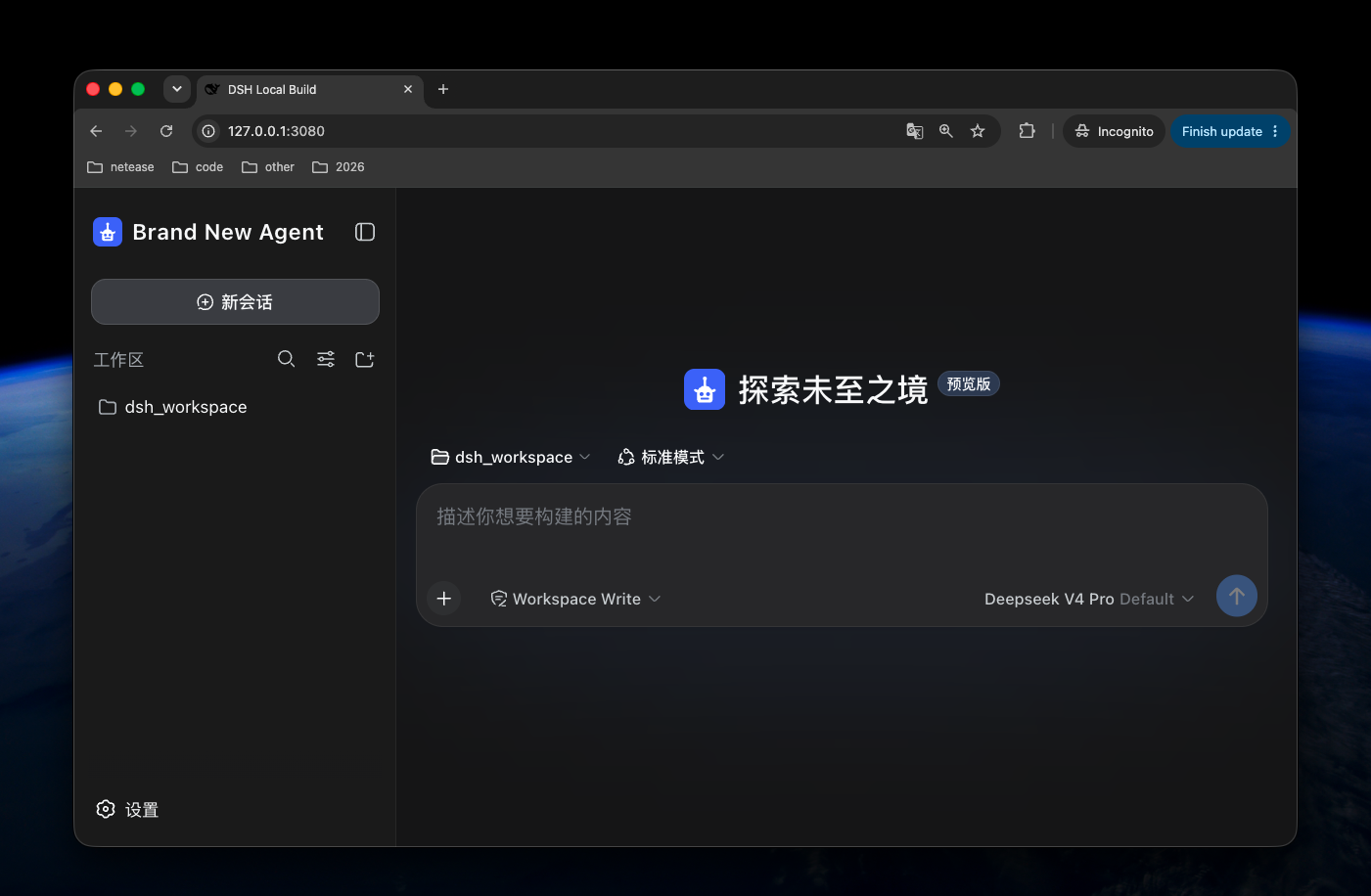
What it changes
- product name in the expanded sidebar and browser title;
- product mark in the sidebar and empty conversation;
- browser favicon and PWA manifest when a logo is configured.
The plugin displays configured marks with centered, proportional fitting in the Web interface. It separately wraps every favicon and PWA icon in a square, transparent SVG canvas, so non-square marks do not stretch. HTTPS images are downloaded by the plugin and embedded into browser metadata, so favicon renderers never need a nested external image request. DSH's runtime session title remains visible and ends with the configured product name.
DSH Core does not currently provide an accepted slot for the empty-conversation slogan. This plugin therefore cannot change it without an intrusive modification; it can support the slogan when DSH Core exposes that slot.
Install
Install the published package into the Web profile:
dsh plugin --profile web add dsh-client-ui-brand
Restart the DSH Web process after installation.
Configure
Add a later Web profile patch, usually at:
$DSH_HOME/profiles/web/cordis.patch.yml
The installed bundle already uses Brand New Agent and its default Agent mark. Every configuration field is optional. Add this later profile patch only when overriding the defaults:
- id: dsh-client-ui-brand
  config:
    productName: Acme Agent
    logoUrl: https://cdn.example.com/branding/acme-agent.svg
    logoAlt: Acme Agent logo
Configuration fields
| Field | Default | Description |
|---|---|---|
productName | Brand New Agent | Sidebar product name, browser title, and PWA name. |
logoUrl | Not set | HTTPS URL, same-origin absolute path, or data:image/... URL for the logo, favicon, and PWA icon. |
logoPath | Not set | Absolute path to one local image served by DSH for the logo, favicon, and PWA icon. |
logoAlt | productName | Accessible logo text. |
Configure either logoUrl or logoPath, not both.
Local logo
- id: dsh-client-ui-brand
  config:
    productName: Acme Agent
    logoPath: /absolute/path/to/acme-agent-logo.svg
    logoAlt: Acme Agent logo
The local file is exposed only through the fixed route:
/plugins/dsh-client-ui-brand/brand-logo
When a logo is configured, the plugin serves the square brand image at
/plugins/dsh-client-ui-brand/brand-mark.svg, generates a PWA manifest at
/plugins/dsh-client-ui-brand/manifest.webmanifest, and replaces the Web
Shell's favicon and manifest links. Without a configured logo, the Web Shell
keeps its default favicon and manifest.
For safety, the path must be an absolute, non-symlink regular file with a
gif, jpeg, jpg, png, svg, or webp extension. The route accepts only
GET and HEAD, never accepts a request-controlled file path, returns 404
when the configured file cannot be read, and sends no-store and nosniff
headers.
License
MIT


