
dsh-annotation
Agent 与工作流ruisenbai/dsh-annotation
为 DeepSeek Harness 会话消息添加就地、可批量提交的注解:在助手回复中选中文字、在旁边写注解,并通过官方输入框一起发送。
- annotation
- deepseek-harness
- dsh-plugin
- messages
- session
验证与兼容性
这里展示目录实际采集到的证据;未声明的信息会明确标为未知。
- 当前版本兼容性
- 已在当前目录版本验证
- 声明的 Harness 范围
- 未声明
- 声明的平台
- 未声明
- 适用 Profile
- web
- 构建授权
- 未知
- 权限声明
- 未声明
- 外部服务
- 未声明
- 遥测声明
- 未知
这不是安全背书;安装前仍应查看源码、权限和配置。
查看证据与判定范围
验证仅覆盖标出的来源、版本和 Harness 环境,不代表未来版本仍然兼容。
github:ruisenbai/dsh-annotation#925e169bad93792174bb5feb414821ec8d454b4f- 插件通过清单与静态结构检查,尚未完成运行时加载检查。
README
kind: package-bundle description: Select text in replies, diffs, or files → annotate → send with a message; replies address each annotation in order, with source navigation for easy reference.
DSH Annotation
English | 中文
Summary
Select text in replies, diffs, or files → annotate → send with a message. Replies address each annotation in order, and source navigation makes notes easy to look up. A per-Session record keeps drafts, sent notes, and attachment state together. The plugin sends notes with the official composer's text, images, and files; unsent work stays in the current browser.
Version 1.1.2 requires DSH >=0.2.1-alpha.2; verification targets 0.2.1-alpha.2. See upgrading before updating an older Host.
Contents
- Install and upgrade
- Supported sources
- Create and edit notes
- Records and attachments
- Send, resend, and retry
- Delete and recover
- Settings
- Data and limitations
- Model experience
- Developer reference
Install and upgrade
The package is distributed through GitHub Releases, not npm. In dsh-market, find ruisenbai/dsh-annotation under Sessions & Messages, then install or update it. The catalog uses the release's stable tarball alias; check the offered version and Host requirement before proceeding.
Manual installation
Install the fixed release into your web profile:
dsh --version
dsh plugin --profile web add https://github.com/ruisenbai/dsh-annotation/releases/download/v1.1.2/dsh-annotation.tgz
dsh plugin --profile web why dsh-annotation
The Host must satisfy >=0.2.1-alpha.2; the final command must resolve dsh-annotation@1.1.2. For a custom profile, replace both occurrences of web with its name. Restart that profile's running Web Host, refresh the page, and check Settings → Annotations. Build instructions and executed verification results are in Development and Compatibility.
Install with an AI agent
Give an agent with terminal access this prompt:
Install dsh-annotation 1.1.2 into my DeepSeek Harness Web profile. Use web unless I specify another profile. Run dsh --version and require >=0.2.1-alpha.2 before continuing. Install https://github.com/ruisenbai/dsh-annotation/releases/download/v1.1.2/dsh-annotation.tgz with dsh plugin --profile <profile> add, then verify dsh plugin --profile <profile> why dsh-annotation resolves 1.1.2. Preserve Host dependencies, Sessions, settings, and browser data. Report the actual commands, versions, result, warnings, and whether a Host restart is needed.
Upgrading from 1.1.1
Update the Host to 0.2.1-alpha.2 before installing 1.1.2. Keep plugin 1.1.1 while using 0.2.1-alpha.1, or 1.1.0 while using a 0.2.0 Host. Drafts, source bubbles, recycle-bin records, and frozen retries retain their existing data formats; do not clear browser storage as an upgrade step. The upgrade guide (中文) gives the version checks.
Supported sources
Use the official preview or sidebar for the source you want to review:
| Source | How to annotate | Navigation |
|---|---|---|
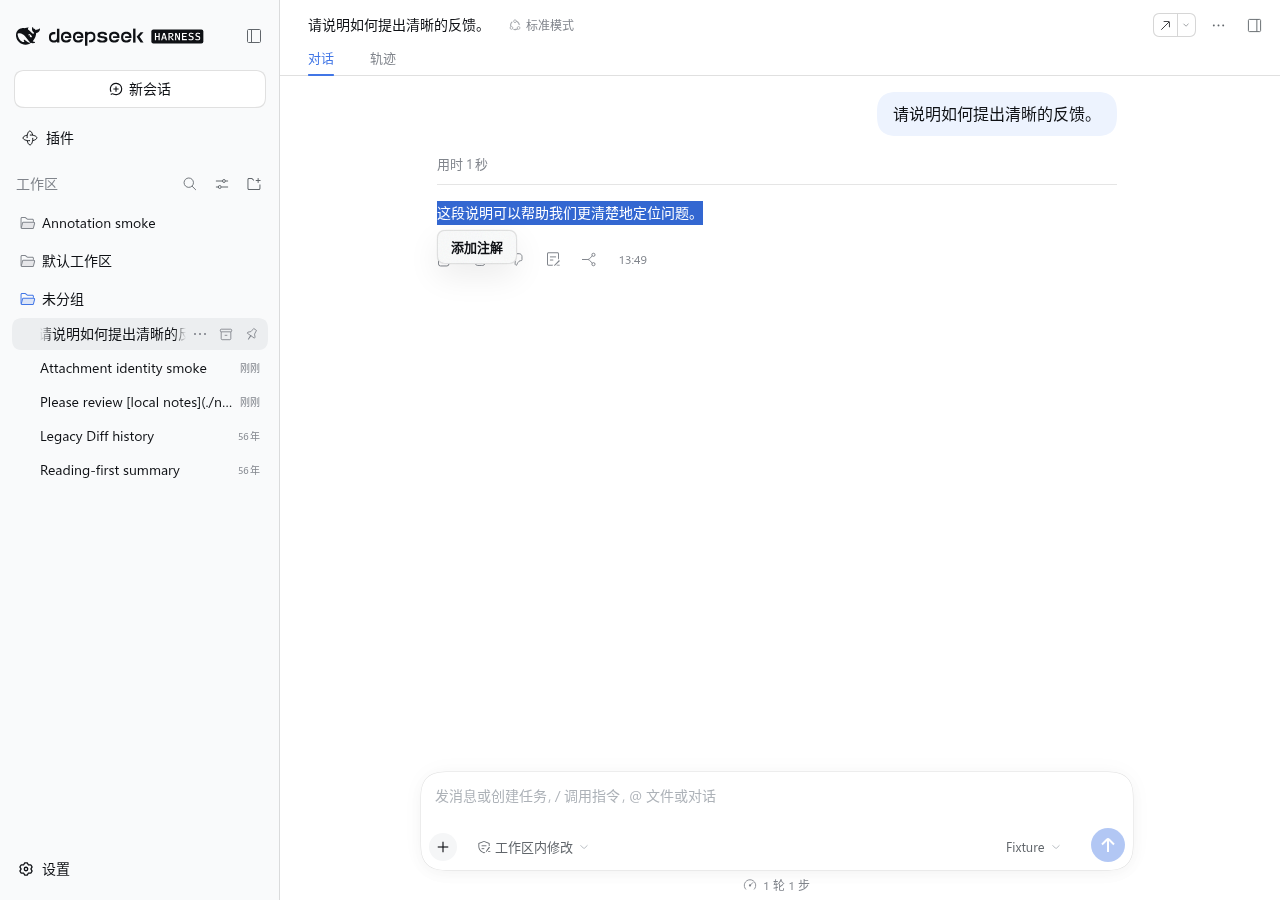
| Assistant reply | Select text within one reply and choose Add annotation | Bubble or record-row pin returns to the saved passage |
| Official text, code, or Markdown file preview | Select a range or choose Annotate this source for the whole file | Opens the official preview and locates the saved range |
| Official HTML, image, PDF, Office, Excel, CSV, or TSV preview | Use the whole-file action; rendered text selection is available only in text/code/Markdown previews | Retains the official resource identity and preview revision |
| Official turn Diff | Open the Diff sidebar from the turn's changed-file card; select a range or annotate the whole file | Opens the same official Diff review and saved annotation |
| Historical Git Diff | Read existing records and saved context | Read-only; no new annotation, editing, attachment, or retry |
Whole-file notes require written feedback. Official Diff hover previews have no creation entry; use the sidebar. Source filters appear when the Session contains at least two types. File and Diff notes retain source identity, range coordinates, and quote context; temporary loading or navigation failures keep the saved record available.
Create and edit notes
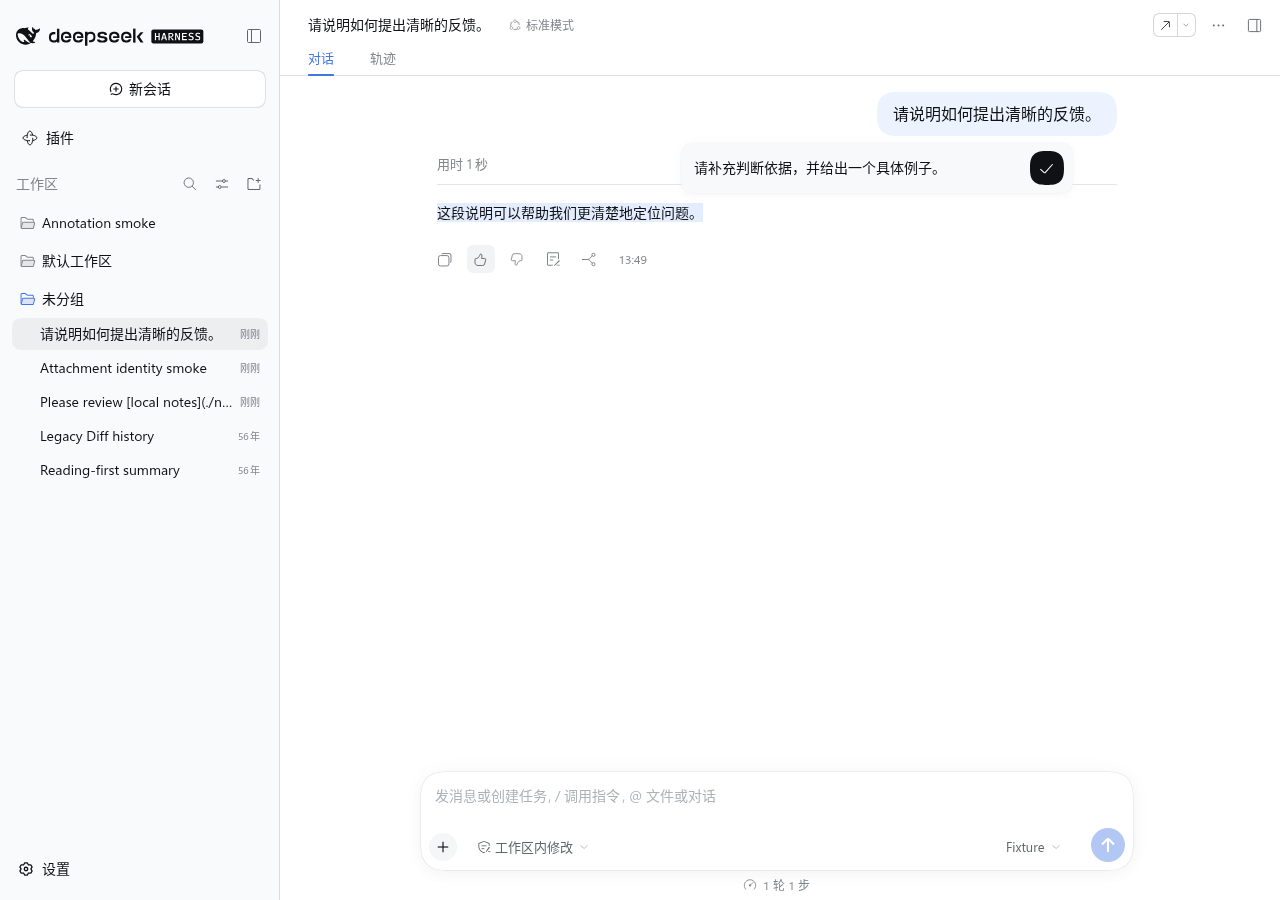
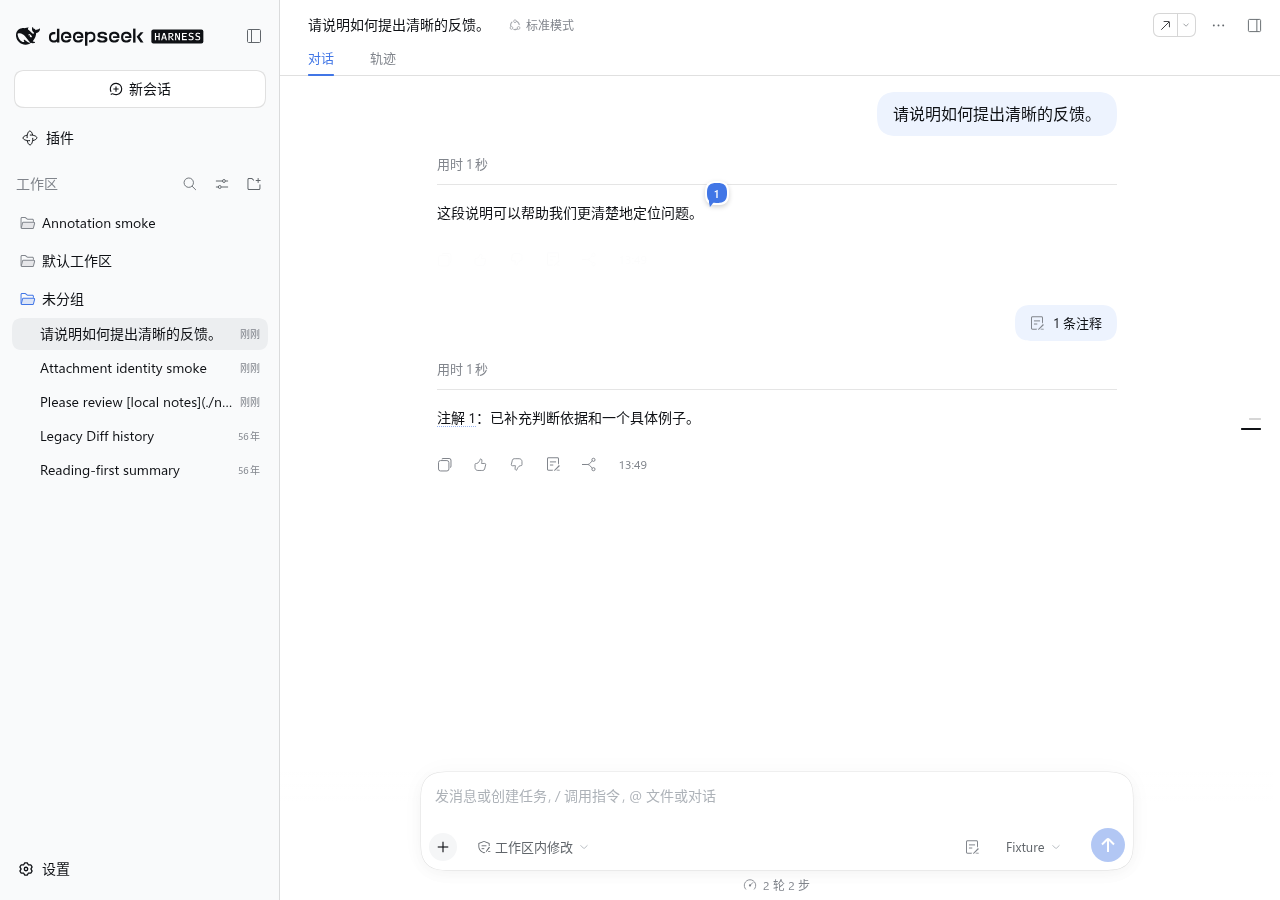
- Select source text and choose Add annotation. Overlapping selections create separate notes.
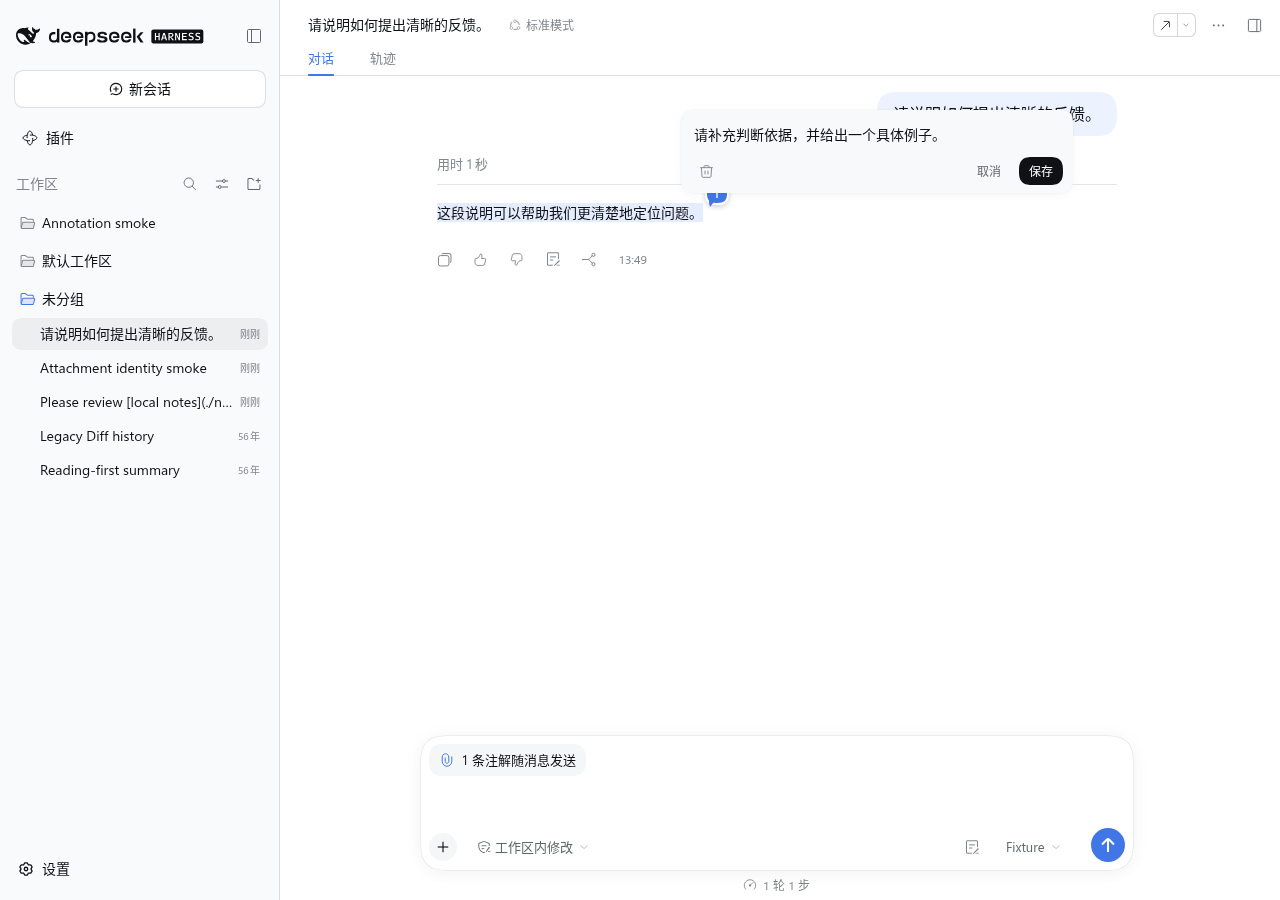
- Type in the editor below the selection. Enter or the check button saves; Shift+Enter adds a line break. Chinese input composition does not trigger an early save. The input grows from one to seven lines, then scrolls internally.
- Explicitly save an empty selection note to mark only the source. For a blank new editor, the first two outside clicks shake it; the third cancels it. Typing in the composer also cancels a blank new editor. Canceling creates no record, bubble, attachment, or trash item. A nonempty new note saves on the third outside click.
- Click a numbered bubble to open its note. Drafts can be edited; sent notes show their saved text and can be attached again. Canceling an edit keeps the saved note. A suspended unfinished edit is not sent.
The bubble follows the last selected character and scrolls with its source. Its blue surface has a white outline and number: translucent and frosted at rest or on hover, opaque while its note or group menu is open, and frosted again after closing. Browsers without backdrop blur use an opaque fill. Nearby bubbles can share a group menu. Source text has no permanent fill or underline; hovering or activating the bubble highlights the quote.
Records and attachments
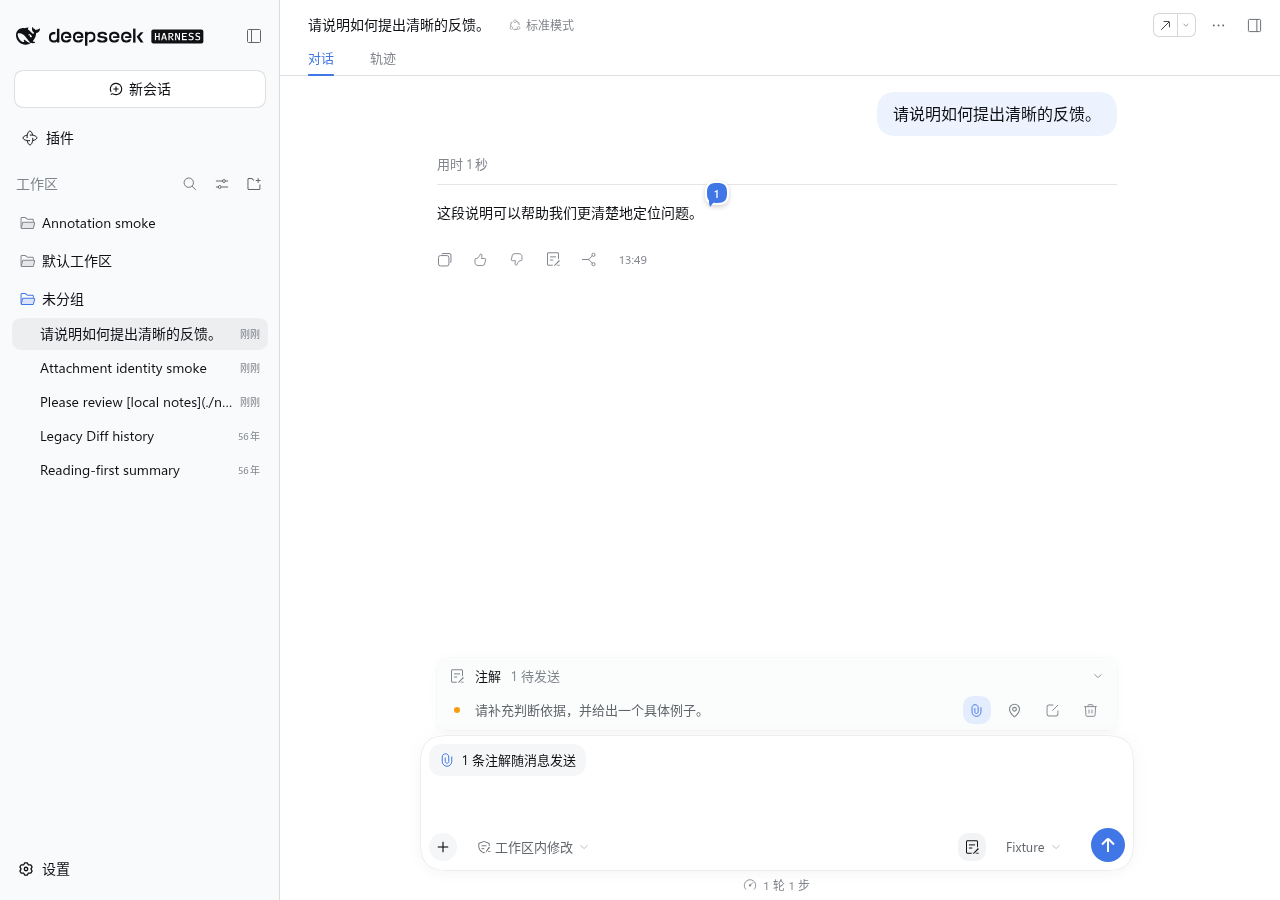
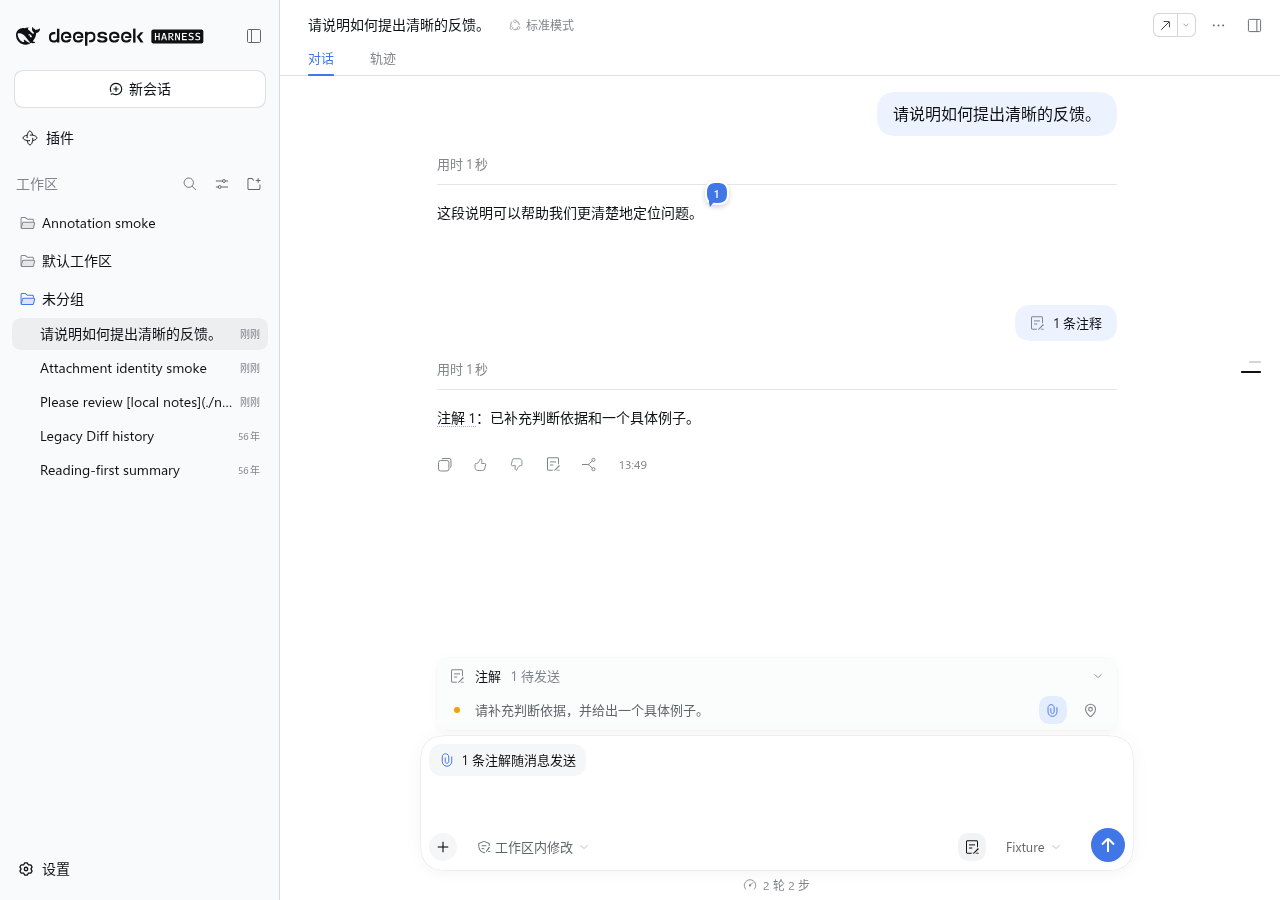
New notes attach to the next message by default without opening the record. The composer's upper-left chip shows the attached count. Hover to preview quotes and opinions; click to expand or fold the record. The annotation button left of the model selector also opens or closes it. A conversation without annotations shows no empty record.
Each record row offers a paperclip to attach or detach, a pin to locate its source, editing for drafts, and deletion when the record is not locked by sending. Hover its text to inspect the quote, source type, creation entry, and saved context. The chip also provides batch detachment and deletion controls on hover or keyboard focus. Detachment keeps the note; deletion moves it to the recycle bin.
The list orders records in three groups:
- Attached notes and unfinished sends, including queued and retryable batches.
- Other unsent drafts.
- Sent history and legacy read-only records.
Each group is newest-created first. Editing leaves creation order unchanged; reattaching a sent note moves it into the first group while retaining its sent status. The All / Body / Diff / File filters use the same ordering. Reordering preserves keyboard focus and, where space permits, the scrolled reading position. Display order does not renumber source bubbles, change submission order, or alter frozen retry contents.
Send, resend, and retry
Use the official composer to send attached notes with optional text, images, and files. Regular slash commands keep their own behavior. The sent user message shows an annotation count above its body: hover a single note to preview it and double-click to locate its source, or expand a multi-note count to inspect and locate individual notes. The record closes when all annotations are sent and none remains attached.
Use a sent note's paperclip to attach it again. Its annotation ID and source bubble stay the same; it remains marked as sent even while selected for another message. A draft, a queued send, a durable sent message, and a model acknowledgement are separate states; only a valid model acknowledgement marks a record as processed.
After a failed send, submit through the composer again to retry the saved batch, or choose Discard in the record to abandon that retry. A retry keeps the original notes, overall requirement, locale, target Session, and attachment order. After a refresh, reselect the same attachments if requested; the plugin refuses changed attachment identities. New edits and selections do not silently replace the saved batch. Queued or already accepted submissions are not sent again by stale retry actions.
Delete and recover
Delete one record or the chip's attached batch to move the notes into the browser-local recycle bin. A successful deletion offers Undo. Sending or retry-locked notes must be released from that operation before deletion; the UI explains the lock. Deleting a sent record never edits the original Session message.
Open Settings → Annotations → Recycle bin to filter by Session and source type, inspect saved quotes and opinions, and restore records. Session labels use project and title metadata when available. Available source snapshots can be previewed, and saved files can be downloaded; a fragment-only notice appears when the complete source was not captured. Permanent deletion and clearing the bin require confirmation. They remove local recycle-bin content, not sent Session messages.
Settings
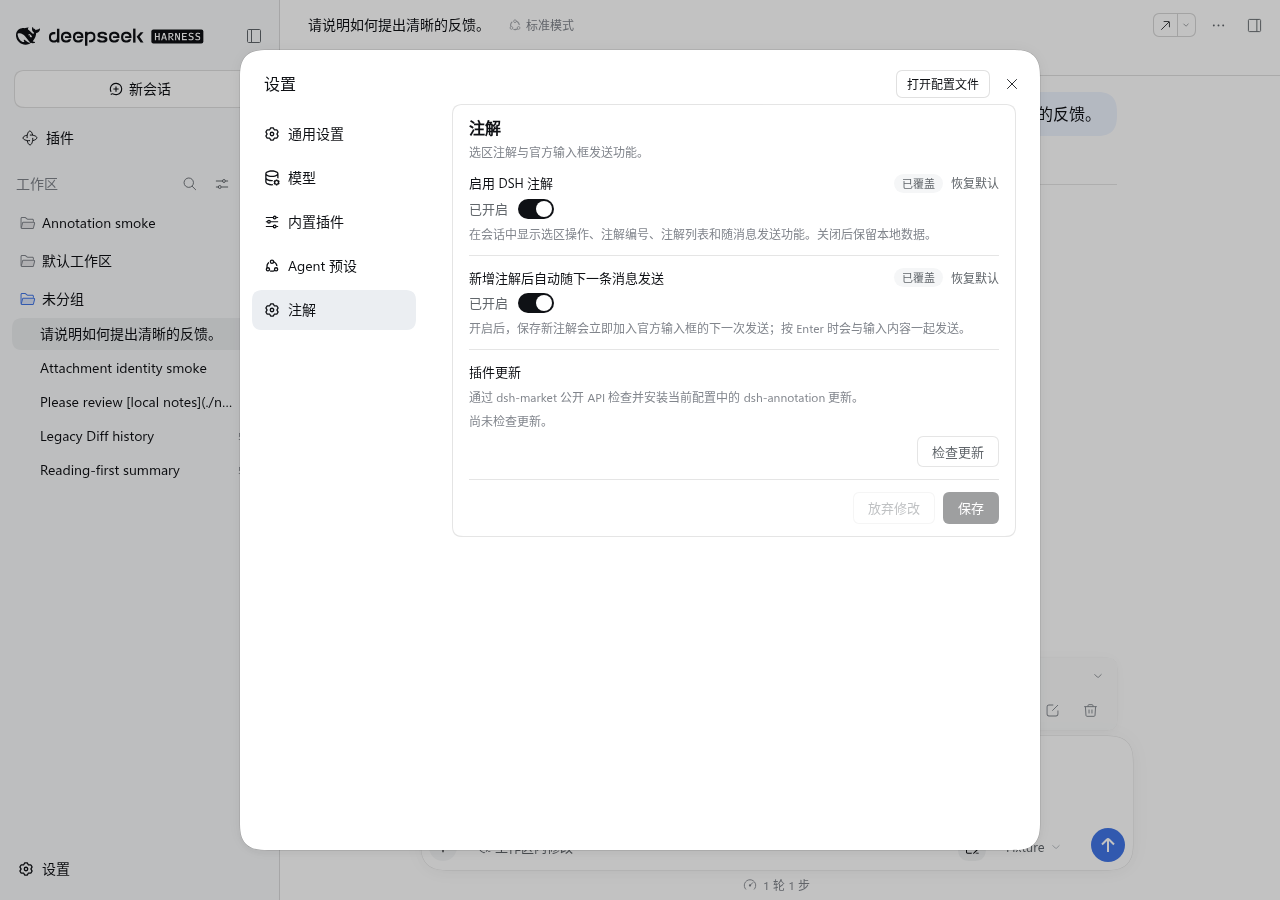
Settings → Annotations provides four switches, all enabled by default:
| Setting | Effect |
|---|---|
| Enable annotations | Shows annotation UI and composer integration; disabling preserves local data |
| File-preview annotations | Enables creation from official file previews |
| Official turn-Diff annotations | Enables creation from the official Diff sidebar |
| Attach new annotations automatically | Attaches a saved new note to the next message; otherwise use its paperclip |
Changes are staged until Save. Discard drops unsaved settings, and Reset restores the inherited/default value for an overridden field. Disabling a source entry preserves its existing records. Historical compact-summary and transcript-hiding settings have no active controls or effects.
When dsh-market provides its public update API, the same card can check and install this plugin's update and show progress. Force is offered only after an eligible release-policy failure; rollback, page refresh, and Host restart depend on the capabilities returned by Market. Without that API, use Settings → Plugin Market. Annotation content is not included in update requests.
Data and limitations
- Unsent drafts, suspended edits, retries, recycle-bin entries, and source snapshots stay in the current browser. They do not synchronize across browsers; clearing site data can remove them. Sent annotation records can be restored from Session history.
- Multiple tabs coordinate local writes and preserve conflicting edits. Corrupt or future-version data is retained with an error instead of being replaced by an empty state.
- A selection cannot cross assistant messages. Markdown, code, and table navigation depend on the Host's rendered content and available history. The plugin does not hide reasoning, tools, or other conversation content.
- Whole-file annotations require an opinion. Large selections ask for confirmation. The default submission limits are 100 annotations and 512 KiB of encoded payload; a profile can configure them.
- Archived Sessions have no active composer; create and attach notes in an editable Session.
- Historical Git Diff records remain read-only. Existing submitted protocols and Session messages are not rewritten during browser-data migration.
- DSH Web in Chromium is the tested browser target. Other browsers, operating systems, future Host releases, and optional third-party plugin combinations need their own verification.
See Privacy for local data and network requests, and Data model for persistence and retry rules.
Model experience
The composer sends the selected annotations as one user message, with each quote, opinion, source identity, and any overall request. The current UI asks for ordered answers to the notes. A source-only mark has no written opinion. Full local source snapshots are not automatically added to the model request.
Replies carry hidden annotation association and completion markers so the plugin can link answers to their sources and recognize processed notes. The displayed text hides those markers while the Session log retains them. Missing or invalid acknowledgements leave the record unprocessed; a successful transport alone is not a model acknowledgement.
Developer reference
The bundle patch inserts one dsh-annotation entry for the Host command and Web Client. Its profile configuration controls commandName, maxPayloadBytes, maxAnnotationsPerSubmission, warnSelectionChars, and locateHistoryPages; the four user switches are edited through Host Settings. Architecture owns the integration and configuration reference.
Development covers builds, package verification, real Web profile checks, and record-performance measurements. Compatibility records the exact Host baseline and executed evidence. Releasing covers GitHub assets and catalog updates.
Contributing · Changelog · License
Dev Note
None.


